
Gwolves Skoll Mini SK-S
4.4Editor score
50 gram ultralight weight
3389 sensor precision
Detachable cable design
This guide compares the top 10 claw grip gaming mice for small hands, evaluating weight, sensor performance, ergonomics, and build quality to help gamers find
Finding the right claw grip gaming mouse for small hands can significantly improve your performance and comfort during long gaming sessions. The ideal mouse should offer precise tracking, lightweight design, and an ergonomic shape that supports your natural grip style without causing fatigue or strain.
We have carefully evaluated ten top-rated options based on their sensor accuracy, weight distribution, switch durability, and overall user feedback. Our analysis focuses on models specifically designed or well-suited for smaller hands that require control and responsiveness in competitive environments.
Each pick in this list highlights unique strengths and trade-offs to help you make an informed decision. Please note that product availability and pricing may change over time, so verify current details before making your final purchase decision.
4.4Editor score

4.6Editor score
4.6Editor score
This side-by-side comparison outlines the key specifications and features of all ten selected mice to help you quickly identify which model aligns best with your specific gaming needs and hand size.


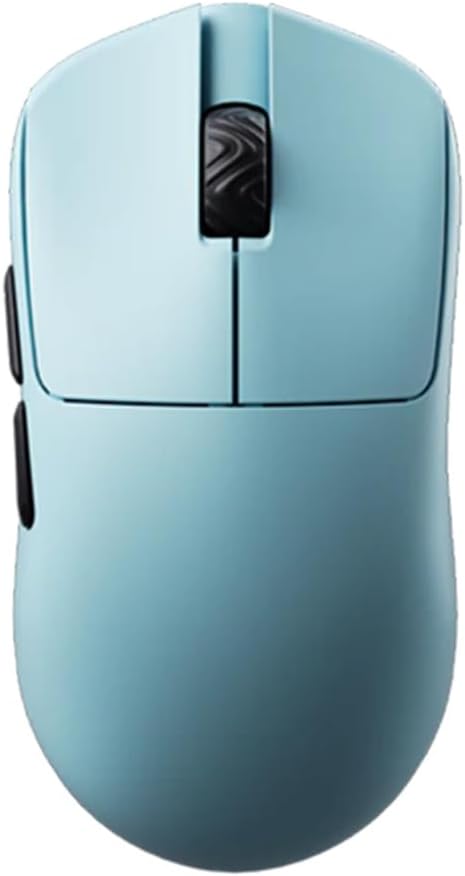
The Gwolves Skoll Mini SK-S is a solid budget option for small hands seeking a lightweight claw grip mouse. With a rating of 4.4, it delivers reliable performance without breaking the bank.
We may earn a commission when you buy through this link, at no additional cost to you.
Weighing only 50 grams, this mouse allows for swift movements and reduced fatigue. The 3389 sensor provides accurate tracking, and the detachable cable adds convenience for portability or storage.
While the honeycomb design helps with weight, it can accumulate dust over time. The RGB lighting is functional but not as customizable as higher end models.
This mouse is ideal for gamers on a budget who prioritize weight and sensor accuracy. It is a strong entry level choice for claw grip users.
The 50 gram weight ensures minimal hand strain during extended sessions.
The 3389 sensor offers consistent tracking across various surfaces.
We may earn a commission when you buy through this link, at no additional cost to you.
The Lamzu Atlantis Mini Champion Edition stands out as a top tier wireless option for small hands. Its 4.6 rating reflects high satisfaction among users seeking precision and comfort.
We may earn a commission when you buy through this link, at no additional cost to you.
Equipped with the PAW3950 sensor and optical switches, it offers near-zero latency and durable clicks. The symmetrical hourglass shape supports claw grip users effectively.
The 8K polling rate is impressive but may drain battery faster. Users might need to balance performance needs with battery life during travel.
This model is perfect for competitive gamers who want flagship performance in a compact form. It justifies its price with premium features.
The 8K compatible wireless connection delivers lag-free responsiveness.
Optical switches provide faster response and longer lifespan.
We may earn a commission when you buy through this link, at no additional cost to you.
The Bloody V7 is an older model that still offers utility for gamers needing extra buttons. Its 4.4 rating suggests it meets basic needs for casual users.
We may earn a commission when you buy through this link, at no additional cost to you.
With eight programmable buttons and macro support, it suits tasks requiring automation. The rubberized coating provides a secure grip for small hands.
The 3200 DPI sensor is less advanced than modern options. The weight may feel heavier compared to ultralight gaming mice.
Choose this if you need customization and durability over peak performance. It remains a reliable tool for specific workflows.
Eight programmable buttons allow complex macro setups.
Rubberized coating prevents slipping during intense play.
We may earn a commission when you buy through this link, at no additional cost to you.
The Pulsar X3 LHD is a rare find for left-handed claw grip users. Its 4.3 rating indicates strong performance in its niche category.
We may earn a commission when you buy through this link, at no additional cost to you.
Weighing 43 grams, it is one of the lightest mice available. The hybrid ergonomic design blends comfort with control for extended use.
The exclusivity limits its appeal to left-handed gamers. The price point places it in the premium segment.
This mouse is ideal for left-handed players seeking top-tier specs. It fills a gap that few others address.
The hybrid design supports both palm and claw grips.
DOT skates offer smooth gliding on hard surfaces.
We may earn a commission when you buy through this link, at no additional cost to you.
The Pulsar X2H mini Wireless offers a balanced mix of features for claw grip users. A rating of 4.1 reflects solid performance with some considerations.
We may earn a commission when you buy through this link, at no additional cost to you.
Its optical switches ensure quick responses, and the PAW3395 sensor is a trusted choice for gaming. The Nordic MCU supports stable connectivity.
As a renewed unit, condition may vary slightly. Battery life is decent but not class-leading for marathon sessions.
This model suits those wanting reliable wireless without top-tier cost. It is a practical choice for regular play.
Optical switches reduce double-click issues over time.
The PAW3395 sensor provides consistent tracking accuracy.
We may earn a commission when you buy through this link, at no additional cost to you.
The Corsair IRONCLAW Wireless SE focuses on features like RGB and macro support. With a 3.9 rating, it may not suit small hands as well.
We may earn a commission when you buy through this link, at no additional cost to you.
Its 26K DPI sensor and extensive battery life are notable. Ten programmable buttons allow for complex setups in games.
The ergonomic shape targets larger hands, which may feel bulky for small hands. The weight might cause strain during fast movements.
Choose this if you prioritize customization and aesthetics over size. It fits those who prefer a full-sized gaming setup.
Ten buttons offer extensive macro and profile options.
Extended battery life supports uninterrupted gaming sessions.
We may earn a commission when you buy through this link, at no additional cost to you.
The V8 Gaming Mouse delivers exceptional lightness with its 36g weight. A 4.5 rating highlights its appeal among competitive users.
We may earn a commission when you buy through this link, at no additional cost to you.
The PAW3950 sensor and Kailh optical switches ensure high performance. A web-based driver simplifies setup without heavy software.
Its very small size may not fit all hand types. Some users may prefer sturdier materials.
This is an excellent pick for lightweight seekers who value sensors. It is optimized for speed and precision.
Web-based driver allows quick setting adjustments.
Ultra-light design reduces wrist strain significantly.
We may earn a commission when you buy through this link, at no additional cost to you.
The Pulsar X2H Wireless offers reliable performance for small hands seeking wireless freedom. Its 4.2 rating reflects solid build quality.
We may earn a commission when you buy through this link, at no additional cost to you.
Features like optical switches and dust-proof encoders ensure longevity. The Nordic MCU supports consistent performance with minimal latency.
The price may be steep compared to competitors. Battery life is good but not exceptional for heavy use.
Select this for a dependable wireless experience in a compact shape. It suits users needing consistent connectivity.
Nordic MCU ensures stable connection during gameplay.
Dust-proof encoders extend overall mouse lifespan.
We may earn a commission when you buy through this link, at no additional cost to you.
The V6 Gaming Mouse combines premium specs with a no-hole design. Its 4.6 rating marks it as a high-quality choice for many.
We may earn a commission when you buy through this link, at no additional cost to you.
The PAW3950 sensor and Kailh switches deliver accurate inputs. The solid shell offers durability without sacrificing too much weight.
The cost is higher than budget options. Some may prefer holes for extra lightness.
This is a top choice for those needing durability and performance. It balances premium features with practical design.
No-hole design enhances structural integrity over time.
PAW3950 ensures flawless tracking in fast games.
We may earn a commission when you buy through this link, at no additional cost to you.
The BenQ Zowie S2-C is a classic driverless design for small hands. With a 4.3 rating, it is trusted by many esports users.
We may earn a commission when you buy through this link, at no additional cost to you.
It requires no software, simplifying setup. The paracord cable minimizes drag for smooth movement.
Lack of customization may limit some gamers. Fixed DPI settings require physical adjustments.
Choose this for a simple, professional-grade experience. It suits those who prefer hardware-focused control.
Driverless design avoids software installation entirely.
Paracord cable reduces drag during rapid motion.
We may earn a commission when you buy through this link, at no additional cost to you.
Selecting the right claw grip gaming mouse involves weighing several critical factors to ensure comfort and performance.
Lighter mice reduce strain during long sessions and are easier to control. Look for models around 40 to 55 grams for optimal handling.
Prioritize weight to prevent fatigue during extended gaming.
High-end sensors like PAW3950 or 3395 offer better tracking accuracy and lower latency. Ensure the mouse supports your DPI needs.
Choose advanced sensors for precise and responsive gameplay.
Optical switches reduce issues like double-clicking and offer faster response than mechanical ones. They often last longer under heavy use.
Opt for optical switches to enhance durability and speed.
A mouse shape that fits your hand size is essential to prevent cramps. Symmetrical or tailored ergonomic designs work well for small hands.
Select a shape that matches your natural hand posture.
Wireless mice provide freedom but require charging. Wired models avoid battery issues but may have cable drag.
Decide based on your preference for mobility or simplicity.
For wireless mice, battery longevity affects usability. Models with long life reduce frequent interruptions during use.
Check battery specs to ensure consistent gaming performance.
Materials and construction impact durability. Holes can reduce weight but may collect dust and degrade faster.
Consider build integrity for long-term reliability.
Some mice offer customization via software while others are driverless. Decide if you need macros or simple plug-and-play.
Balance features with your need for simplicity.
Begin by adjusting the DPI settings to match your comfort level. A proper DPI ensures the cursor moves at a speed you can control.
Clean the mouse feet regularly with a soft cloth to maintain smooth gliding. Dust accumulation can cause friction or tracking issues.
Store the mouse in a clean, dry environment when not in use. This protects internal components from potential damage or wear.
A mouse designed for small hands typically has a compact body and a lower profile. This ensures your fingers can reach all buttons comfortably without stretching or straining during play.
It depends on personal preference. Claw grip offers more control for precise movements, while fingertip can allow faster swiping. Both can work if the mouse fits your hand.
Ultralight mice reduce fatigue significantly over long periods. If you play frequently, the investment can be justified by improved comfort and performance.
Look for a mouse with a shape that supports finger placement above the main buttons. A curved back can help keep fingers steady during clicks.
Not all mice work well with claw grips. Some models are designed for palm or fingertip styles. Check the ergonomic design to ensure compatibility.
Modern wireless technology is highly reliable with minimal latency. Most pro players now use wireless mice for competitive play.
Replacement depends on usage and wear. If switches fail or tracking becomes inconsistent, it is time for a new unit.
This guide highlighted ten excellent options catering to small hands with claw grip preferences. Each model brings unique strengths in weight, sensor quality, or ergonomics.
Prioritize what matters most to you, whether that is wireless freedom, budget, or sensor precision. Matching these needs will lead to a satisfying purchase.
Prices and availability change regularly. Always verify current details before purchasing to ensure you get the best value available.