
Fosmon Fast Charging Station
4.5Editor score
SGS certified safety standards
40 to 45 hour battery life
Smart charging with LED status
This guide compares the top 10 Controller Charging Station for Xbox options based on battery life, charging speed, build quality, and value for money.
Finding a reliable Controller Charging Station for Xbox is essential for gamers who want uninterrupted play sessions. A good dock ensures your controllers stay powered without constant battery swaps or cable clutter on your desk.
We evaluated ten top-rated stations using real-world usage scenarios and technical specifications. Our comparison covers charging speed, battery capacity, safety features, and overall design to help you find the perfect match for your setup.
Each pick below highlights specific strengths like long battery life or quick charging times. Keep in mind that availability and pricing can fluctuate, so check the latest details before making your final decision today.
4.5Editor score

4.6Editor score

4.4Editor score
This table provides a side-by-side look at the key specifications and features of each station we reviewed to help you make an informed choice quickly.



The Upgraded Controller Charger Station stands out with its massive 6200mWh battery packs that provide up to 25 hours of play time. This makes it ideal for marathon gaming sessions without interruption. The dock is rated highly by users for its reliability and thoughtful design features.
We may earn a commission when you buy through this link, at no additional cost to you.
Its standout feature is the unique X shape LED indicator that clearly shows charging status without being distracting. The green light indicates standby while red shows charging. The station also includes four battery covers to fit both standard Xbox One controllers and newer Series X S models seamlessly.
While the batteries sit on the bottom of the dock which some might find less convenient than internal storage the capacity outweighs this minor drawback. Also note it only supports official controllers meaning third party ones will not work with this specific battery kit.
If you prioritize longevity and visual clarity in your charging setup this station is a top recommendation. It eliminates the need for disposable AA batteries effectively saving money over time. The safety certifications ensure your hardware remains protected during overnight charging cycles.
With 6200mWh capacity you can game for over a day on a single charge reducing frequent interruptions during critical gameplay moments.
The X shape LEDs provide immediate feedback on battery status without requiring you to check the controller manually.
We may earn a commission when you buy through this link, at no additional cost to you.
The Fosmon Fast Charging Station offers impressive value with a 5280mWh battery capacity that supports up to 45 hours of play. It is certified by SGS ensuring high safety standards for your equipment. This dock is perfect for budget conscious gamers who do not want to compromise on battery life.
We may earn a commission when you buy through this link, at no additional cost to you.
Its intelligent charging board prevents overheating and short circuits while stopping charge once batteries are full. The two LED indicators give you clear status updates for each slot. The design is straightforward allowing you to simply place controllers to start charging immediately.
One limitation is that it does not support the Xbox Elite 2 controller so those users will need a different solution. Additionally the design is functional but lacks premium styling elements found in higher priced alternatives.
For most users seeking reliable performance at a lower cost this dock is an excellent choice. The lifetime warranty provided by Fosmon adds extra peace of mind for your purchase. It effectively replaces disposable batteries to save you money in the long run.
SGS certification ensures the dock meets rigorous safety standards for consistent performance and user protection.
Place and charge functionality eliminates cable mess and makes docking controllers effortless for daily use.
We may earn a commission when you buy through this link, at no additional cost to you.
The Razer Universal Quick Charging Stand focuses on premium design and ease of use with its magnetic contact system. It matches official Xbox controller colors for a seamless look on your desk. This stand is designed to charge your controller in under three hours with built in safety protections.
We may earn a commission when you buy through this link, at no additional cost to you.
One unique feature is the one handed navigation support allowing you to control the Xbox dashboard even while the controller is docked. It works with almost all Xbox controllers excluding the Elite 2 which is a notable exception for some users. The magnetic mount ensures your controller stays secure during charging.
However this stand does not include rechargeable batteries so you must purchase those separately if you do not already have them. The price is also significantly higher than other options on this list reflecting the premium build quality and brand reputation.
If you want a docking station that looks like an extension of your controller and offers convenience features this is the best pick. It is ideal for streamers or enthusiasts who care about aesthetics and user experience. The quick charge time ensures minimal downtime between gaming sessions.
Designed to match Xbox controllers the stand blends perfectly into your gaming setup without looking like a generic accessory.
The magnetic contact system keeps your controller firmly in place ensuring uninterrupted charging without accidental dislodges.
We may earn a commission when you buy through this link, at no additional cost to you.
The PowerA Solo Charging Stand is a compact solution for single player setups that need a reliable place to dock one controller. It comes with an 1100mAh rechargeable battery and battery door making it a complete package out of the box. As an officially licensed product it guarantees compatibility with Xbox Series X S and Xbox One controllers.
We may earn a commission when you buy through this link, at no additional cost to you.
Its design is simple and space saving which is great for smaller desks or minimalist setups. The two year limited warranty from PowerA adds confidence in the product durability. It eliminates the need for AA batteries making it more eco friendly than disposable options.
The main trade off is that it only charges one controller at a time which may be limiting if you often game with friends. Also the battery capacity is smaller than dual packs so you may need to recharge more frequently depending on usage.
This stand is perfect for solo gamers who want a no fuss charging solution without extra clutter. It is easy to use and fits well with official Xbox accessories. For those needing a second dock for a guest controller this works well alongside other models.
Being officially licensed means the stand meets Microsoft standards for safety and performance with your controllers.
The solo design takes up minimal desk space making it ideal for tighter gaming setups.
We may earn a commission when you buy through this link, at no additional cost to you.
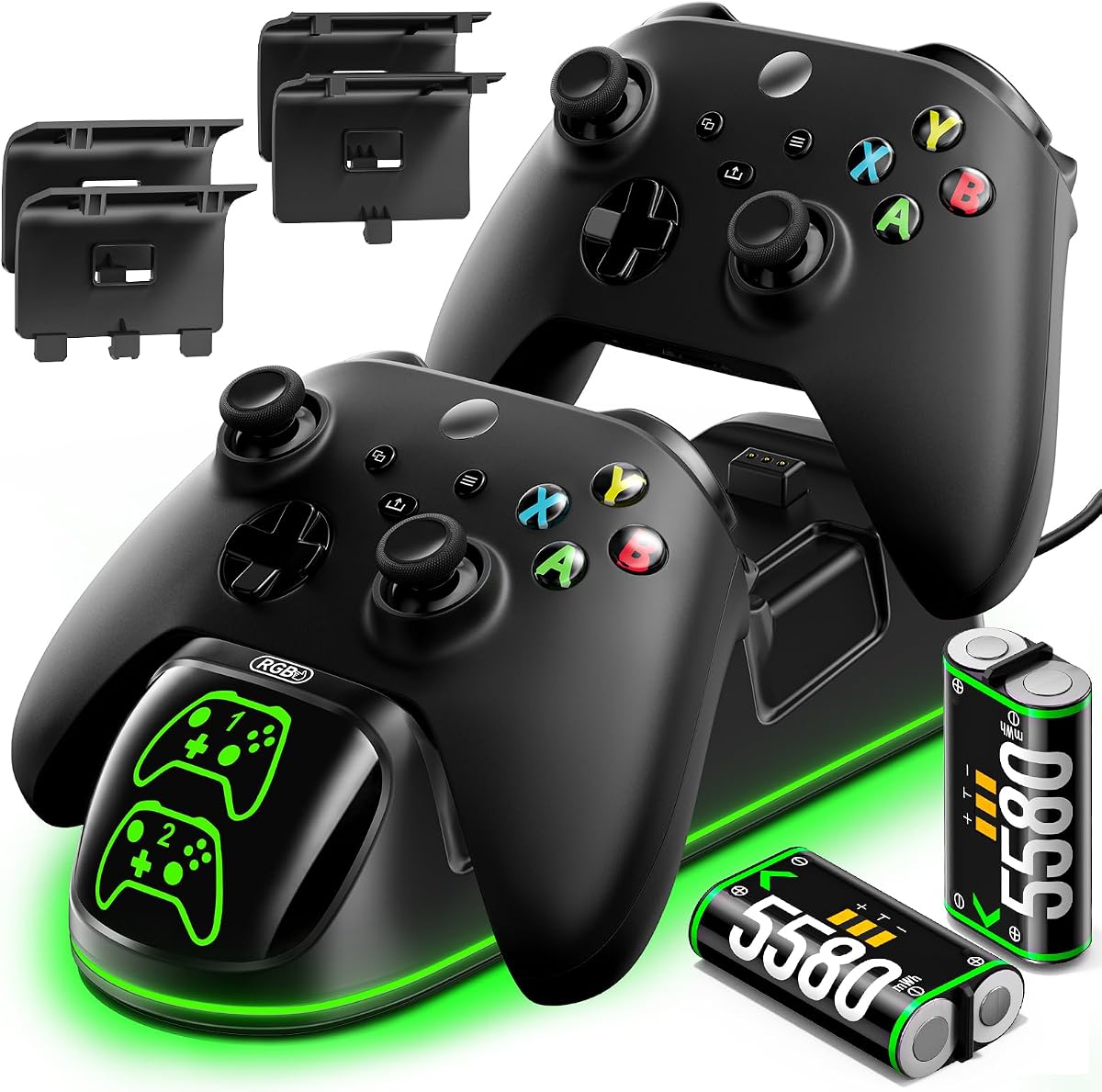
The OlVO XSX Controller Charger impresses with its fast charging capability that fully recharges batteries in under 2.5 hours. It includes two 5580mWh NiMH battery packs and covers for both Xbox One and Series models. User ratings are exceptional indicating high satisfaction with performance and ease of use.
We may earn a commission when you buy through this link, at no additional cost to you.
The red and green LED indicators provide quick visual feedback on charging status. You can expect around 20 hours of play time per charge which is sufficient for most daily gaming sessions. The battery packs can be recharged over 3000 times which is a great lifespan.
As with most kits batteries are separate from the dock so you need to insert them properly before charging. Also it is designed only for official controllers meaning third party ones will not work with this specific set.
If speed is a priority for you this charger reduces wait time between sessions significantly. The included accessories cover most controller types so you do not need to buy extras. It is a reliable choice for serious gamers who value quick turnaround times.
Under 2.5 hour charge times mean your controllers are ready to play quickly after being low on power.
With over 3000 recharge cycles the battery packs are built to last through years of gaming use.
We may earn a commission when you buy through this link, at no additional cost to you.
The 8BitDo Charging Dock offers a magnetic secure charging experience that ensures your controller stays perfectly aligned while charging. It is officially licensed and designed to complement the look of Xbox Series X S and Xbox One controllers. The dock includes an 1100mAh rechargeable battery and battery doors.
We may earn a commission when you buy through this link, at no additional cost to you.
Its LED indicator uses amber for charging and white for fully charged providing intuitive status updates. The design is compact and aesthetically pleasing making it a nice addition to any gaming setup. It works seamlessly with official Xbox wireless controllers.
Since it is a solo dock you can only charge one controller at a time which may not suit multiplayer households. The 1100mAh battery is standard but offers less play time compared to high capacity packs from other brands.
This dock is ideal for those who appreciate magnetic alignment and clean design. It simplifies charging by ensuring consistent contact without fiddling with ports. For players who want a stylish and reliable dock for their primary controller it is a solid option.
Magnetic secure charging ensures consistent power transfer without worrying about connector alignment or cable strain.
Official licensing guarantees compatibility and design language that matches official Xbox accessories closely.
We may earn a commission when you buy through this link, at no additional cost to you.
This Charger Station stands out with its Robot helmet inspired aesthetic that adds a superhero vibe to your game room. It includes two 5520mWh batteries and four battery covers for both controller generations. The bottom compartment is designed to store spare batteries conveniently so you do not misplace them.
We may earn a commission when you buy through this link, at no additional cost to you.
The LED indicators can be toggled with a button on top so you can turn off lights if they are too bright at night. It supports 18 to 25 hours of play time and uses USB C for faster charging. The protection system prevents overcharge and overheating during use.
While the design is eye catching some users might prefer a more subtle look for their setup. The storage space is small which means it only holds the included batteries and not much else.
If you want a dock that looks unique and functional this is a great choice. The combination of high capacity batteries and smart storage makes it practical for daily use. It is a cool accessory that elevates your gaming atmosphere with its distinctive style.
The robot helmet front panel adds a unique visual element to your desk or console setup.
The bottom compartment keeps spare batteries handy so you never waste time looking for replacements.
We may earn a commission when you buy through this link, at no additional cost to you.
The Nyko Charging Station offers dual controller charging with two 1100mAh batteries included. It features an extra USB port which can be used to charge other accessories like headsets or phones. The green LED lights provide clear visibility of charging status and add a cool aesthetic to your setup.
We may earn a commission when you buy through this link, at no additional cost to you.
Its drop and charge design makes it easy to dock controllers without fiddling with cables. The station also includes a USB C cable for connection to your console or wall adapter. It is a budget friendly option for those who need multiple controller charging without high costs.
The 1100mAh batteries provide about 15 hours of play time which is decent but less than high capacity options. The build quality is functional but not as premium as some other brands on this list.
This station is well suited for casual gamers who want simple dual charging and extra port utility. It handles multiple controllers well and keeps your desk organized. If you need a straightforward dock that works out of the box this is a reliable choice.
The additional USB port allows you to charge other devices while your controllers dock on the station.
Drop and charge functionality reduces setup time and makes docking effortless after gameplay sessions.
We may earn a commission when you buy through this link, at no additional cost to you.
The Controller Gear Pulse Red Stand is designed to match the exact color and material of Pulse Red Xbox controllers. It features a magnetic contact system for secure charging and allows one handed navigation while docked. This stand is officially licensed ensuring compatibility and build quality.
We may earn a commission when you buy through this link, at no additional cost to you.
Its ergonomic design lets you browse the Xbox dashboard without removing the controller which is a unique convenience feature. The build quality uses premium materials that feel durable and look consistent with your console. It comes with a rechargeable battery and battery door included.
Since it only charges one controller at a time you may need a second dock if you have multiple players. The color match is specific so it works best if you own the matching controller model.
If you own a Pulse Red controller this stand offers the best visual integration and usability features. It is a premium choice for those who want their accessories to look coordinated. The one handed navigation feature is particularly useful for menu browsing while charging.
The stand matches the Pulse Red color exactly creating a seamless visual setup for your gaming gear.
One hand navigation allows you to interact with the Xbox dashboard without unplugging the controller.
We may earn a commission when you buy through this link, at no additional cost to you.
This Controller Charger Station features 9 RGB lighting modes to enhance your gaming atmosphere with customizable colors. It includes two 6200mWh batteries that offer 25 to 30 hours of play time. The adjustable output power ensures safe charging without overcharging your controllers or batteries.
We may earn a commission when you buy through this link, at no additional cost to you.
You can switch between lighting modes with a simple touch or long press to turn lights on and off. The station supports Xbox One Series X S and Elite controllers with included battery covers. It acts as a storage stand when not charging keeping your controllers organized.
While the RGB lighting is a fun feature some may find it distracting in a dark room. The light button helps but requires interaction to toggle which can be a minor inconvenience.
For gamers who love immersive lighting this dock adds a fun visual element to your setup. The battery capacity is strong ensuring long sessions without interruption. It is a versatile option that combines functionality with customizable style.
9 RGB modes let you customize the dock to match your room lighting or personal preference.
The station adjusts output power automatically to prevent overcharging and protect your controller hardware.
We may earn a commission when you buy through this link, at no additional cost to you.
Choosing the right station depends on your gaming habits and setup needs. This guide outlines key factors to help you decide which features matter most.
Battery capacity determines how long you can play before recharging. Higher capacity like 6000mWh provides more hours per charge which is great for long sessions. Look for packs rated at least 5000mWh for reliable all day use.
Prioritize high capacity batteries if you play for long periods.
Faster charging means less downtime when your controller runs low. Some docks charge in under 2.5 hours while others take 4 to 5 hours. Quick charging is useful if you need your controller back quickly during breaks.
Choose a dock with under 3 hour charge time if speed is a priority.
Ensure the dock works with your specific Xbox model such as Series X S or Xbox One Elite. Some chargers support all official controllers while others may exclude certain versions. Check the product details for compatibility before buying.
Verify your controller model is supported to avoid return hassles.
Some kits include battery covers for different controller generations to make swapping easier. If you own both old and new controllers look for packs that include covers for both. This adds convenience and reduces extra costs.
Look for stations that include covers for your specific controller model.
Safety features like overcharge and overheating protection are essential to protect your hardware. Most modern docks have these but check for certifications like SGS for extra assurance. This ensures your controllers remain safe during overnight charging.
Ensure the dock has protection against overcharge and overheating.
LED indicators show charging status without needing to check the controller. Look for clear colors like green for full and red for charging. Some docks have buttons to turn off lights if they are distracting in dark rooms.
Choose a dock with clear LED status lights for easy monitoring.
Consider how the dock stores batteries when not in use. Some have bottom compartments while others hold batteries inside. A secure storage design prevents losing batteries and keeps your desk organized.
Select a station with convenient battery storage to keep spare batteries safe.
Price varies based on battery capacity and design features. Budget options offer basic dual charging while premium ones include high capacity packs and RGB. Determine your budget and find the best balance of features for your needs.
Set a budget and prioritize features that matter most to your use case.
Start by inserting the rechargeable batteries into your controller using the provided battery covers. Ensure the polarity matches the markings inside the controller battery compartment to avoid damage.
Place the controller on the dock securely so the metal contacts align properly. Wait for the LED indicator to turn red which shows the charging process has started successfully.
Once the indicator turns green the battery is fully charged. You can leave the controller on the dock safely as most models have auto stop features. Clean the contacts periodically with a dry cloth to ensure good connectivity.
Yes most modern charging stations have auto stop features that prevent overcharging once batteries are full. Look for docks with safety certifications that explicitly mention this protection.
Most official stations only support Microsoft branded controllers. Some third party controllers may work but you risk connection issues. Check product specs before trying with non official controllers.
Depends on the battery capacity. High capacity packs like 6000mWh offer 20 to 30 hours while smaller 1100mAh packs offer 15 hours or less.
Most kits sell replacement battery packs separately. Look for models where batteries are not permanently fixed to the dock so you can swap them easily later.
NiMH batteries typically offer better safety and consistent power output. They also have higher cycle life compared to standard lithium ion batteries in many gaming cases.
Some models allow charging batteries directly in the dock slots while others require the controller to be docked. Check the product description to confirm the charging method.
Most stations include a USB or USB C cable. Always verify the package contents before purchasing to ensure you have the right cable type.
LED indicators provide status updates. Red usually means charging while green means full. Some models have lights you can turn off if needed for night use.
We reviewed ten top options including the Upgraded Controller Charger Station and Fosmon Fast Charging Station. Each offers unique strengths from high capacity to quick charging speeds and secure magnetic docks.
Prioritize battery capacity and safety features to ensure long term performance. If you want style look for RGB or custom color docks. For value check for stations that include covers and batteries.
Remember to check current pricing and availability before buying. Models vary in stock and may change as new versions launch. Select the dock that best fits your specific controller type and gaming habits.