
Cooling Fan for Nintendo Switch 1/2
4.6Editor score
LED Temperature Display
Adjustable Fan Speed
Micro USB Powered
This guide compares ten top cooling fans for Nintendo Switch Dock to help you choose the right model for optimal performance and temperature control during
Maintaining optimal temperature is crucial for your Nintendo Switch gaming experience. Overheating can cause performance throttling and system malfunctions during intense gameplay sessions. A reliable cooling fan accessory ensures your dock operates efficiently without risking hardware damage or unexpected interruptions.
We evaluated ten distinct cooling solutions based on performance metrics design compatibility and user feedback. Each product was analyzed for fan speed control noise levels and integration with official dock accessories to ensure accurate comparisons. This list covers various options ranging from simple attachments to advanced replacement stations.
Each review highlights specific strengths weaknesses and ideal use cases for different player needs. Prices and availability fluctuate regularly so always verify current offers before purchasing. Our goal is to provide clear actionable insights to help you select the perfect cooling solution for your setup.
4.6Editor score

3.9Editor score

4.4Editor score
The following table presents a side-by-side comparison of all ten cooling solutions including their core specifications design features and unique selling points to facilitate informed decision making.




This cooling fan stands out as the top choice for enthusiasts seeking precise thermal management during extended Switch gaming sessions. With a strong rating of 4.6 stars it delivers consistent performance and user satisfaction across diverse use cases. The standout quality is its digital LED display showing real time temperature and fan speed.
We may earn a commission when you buy through this link, at no additional cost to you.
The adjustable speed range spanning from 510 RPM to 6000 RPM offers unmatched flexibility for different environments and noise preferences. Users can monitor the exact air temperature exiting the console ensuring accurate heat dissipation without guesswork. The fixed pad included ensures stability preventing the fan from shifting during intense play.
While it offers exceptional control the reliance on Micro USB might inconvenience users preferring USB C connections on modern setups. The design is slightly larger than minimalist options which could clutter compact entertainment centers. These trade-offs are acceptable given the superior monitoring and control features offered.
Players who prioritize data driven cooling and long hours of uninterrupted gaming should choose this model. It is perfect for hardcore gamers who need reliable thermal protection and appreciate detailed system feedback. The lifetime warranty adds significant value ensuring long-term reliability for your Switch dock setup.
The LED display provides immediate feedback on air temperature allowing you to react to heat buildup instantly.
Anti-slip sponge pads secure the fan in place preventing accidental movement during gameplay sessions.
We may earn a commission when you buy through this link, at no additional cost to you.
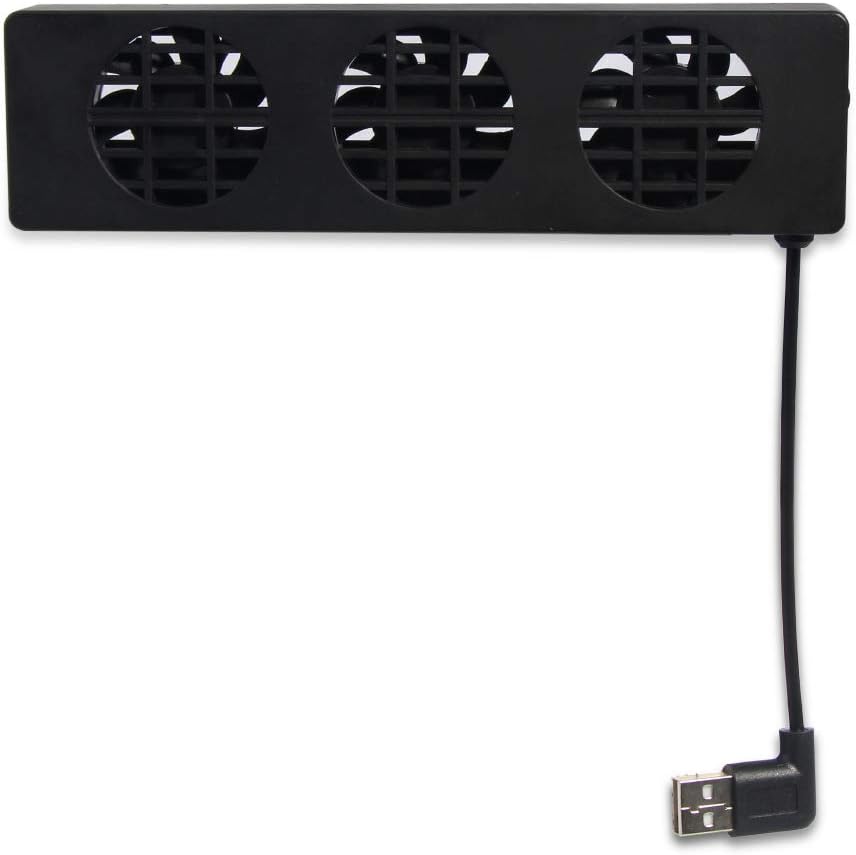
The TNP cooling fan delivers reliable performance at an affordable price point making it an attractive budget option for Switch owners. Its design focuses on simplicity and ease of use without sacrificing core cooling functionality. The three high speed fans work together to provide efficient air circulation around the dock base.
We may earn a commission when you buy through this link, at no additional cost to you.
Installation is straightforward allowing users to insert the unit onto the back of the original dock quickly. Connecting directly to the dock's USB port eliminates the need for external power adapters or cables. The turbo and normal modes offer basic control to balance cooling performance with noise levels.
Lack of a temperature display means users cannot monitor heat levels directly during use. The fixed speed settings might not suit every user who prefers granular adjustments. However these limitations are minor compared to the convenience and price advantage this model offers.
Ideal for casual gamers or those seeking a simple solution to prevent overheating during longer sessions. If you want effective cooling without complex controls this model fits your needs well. It ensures your system runs smoothly without requiring technical knowledge or complex setups.
Three built-in fans maximize ventilation to lower console temperature effectively during demanding games.
Designed specifically for the original dock it fits perfectly without obstructing other connections.
We may earn a commission when you buy through this link, at no additional cost to you.
This advanced cooling stand is designed specifically for the upcoming Nintendo Switch 2 providing forward-looking thermal protection and expanded utility. It features dual fans that automatically activate upon connection ensuring the system stays cool from the moment gameplay begins. The modern design incorporates RGB lighting to match contemporary gaming aesthetics.
We may earn a commission when you buy through this link, at no additional cost to you.
Beyond cooling it offers practical storage with six game card slots allowing quick access to your favorite titles. Three USB ports provide ample connectivity for controllers headsets and other accessories reducing cable clutter significantly. The three-stage cooling adjustment gives users flexibility to optimize performance based on current load.
The requirement for a Switch 2 dock limits its current usefulness to early adopters preparing for new hardware. It is priced higher than standard fans which may not justify the extra features for current Switch owners. However for future buyers these features represent significant convenience and performance advantages.
Gaming enthusiasts anticipating the next console generation should consider this comprehensive cooling solution. It offers a complete upgrade path with storage and connectivity included. Investing early ensures your setup is ready for high performance gaming without immediate need for additional accessories.
Two coordinated cooling fans ensure efficient heat removal to prevent system throttling during play.
Six dedicated slots hold game cards securely keeping your collection organized and accessible.
We may earn a commission when you buy through this link, at no additional cost to you.
Designed exclusively for the 2021 OLED dock this accessory blends thermal performance with aesthetic enhancement. The blue light feature syncs with the fan operation providing a stylish visual element. Its turbo fans blow air directly onto the base to maximize heat dissipation efficiency during extended play.
We may earn a commission when you buy through this link, at no additional cost to you.
The top of the fan includes fourteen game card slots offering substantial storage for your library. This helps reduce clutter on shelves and keeps your most played games accessible without removing them from the case. The Type-C cable ensures compatibility with modern power standards and simplifies cable management.
It fits only the OLED dock so it cannot be used with standard or Lite models. The lack of adjustable speed settings means you must accept the fixed turbo operation which may be noisy in quiet rooms. These constraints are acceptable if you prioritize style and storage alongside cooling.
Owners of the OLED Switch seeking a complete dock upgrade will find this model highly suitable. It enhances both function and form with ample storage and a cohesive design. If you want your setup to look professional and stay cool this accessory is an excellent choice.
Turbo fans force air directly onto the console base to accelerate cooling quickly.
Fourteen slots provide room for a large collection of games within the dock unit.
We may earn a commission when you buy through this link, at no additional cost to you.
The Dobe cooling fan emphasizes quiet efficiency making it ideal for environments where noise is a concern. Its high speed fan accelerates airflow inside the base to dissipate heat without generating disruptive sound. The white finish perfectly matches the official OLED dock maintaining a clean uniform appearance.
We may earn a commission when you buy through this link, at no additional cost to you.
Installation involves connecting the Type-C cable to the OLED base for power supply. The integrated LED lighting synchronizes with the fan state adding visual polish to your setup. This synchronization ensures that when the fan is active the lighting confirms operation at a glance.
Because it uses a single fan it might not cool as aggressively as triple fan alternatives. The lack of speed control means you rely on a fixed performance level which may be excessive for light games. However for most users the balance of noise and cooling is appropriate.
Casual players who value silence and design consistency should consider this fan. It provides reliable cooling without distraction ensuring focus remains on gameplay. The seamless integration with the OLED dock makes it a refined choice for premium setups.
Engineered to minimize noise allowing immersive gaming sessions without fan distractions.
LED effects turn on and off with the fan providing clear visual status indicators.
We may earn a commission when you buy through this link, at no additional cost to you.
This compact cooling attachment keeps your OLED dock tidy while delivering efficient thermal performance. Its 3000 RPM fan accelerates airflow to cool the console quickly during intense gaming sessions. The white color and blue LED light match the aesthetic of your entertainment center seamlessly.
We may earn a commission when you buy through this link, at no additional cost to you.
Space saving design ensures your gaming setup remains organized without adding bulky components. Simply plug it into the USB port of your dock for power. This ease of use makes it a practical choice for users who need cooling without complex installation.
The fixed speed fan might not provide enough cooling for maximum load scenarios. Lack of additional features like game slots means it is purely a functional cooling tool. However for a budget friendly option it delivers reliable protection against overheating.
Those seeking a simple cost effective solution to prevent lag should choose this model. It works well for short to medium gaming sessions where constant cooling is not critical. Its compact size fits easily into tight spaces without cluttering your desk or shelf.
High RPM fan ensures quick heat removal from the console base to maintain performance.
Clean white design with blue LED complements modern TV stands and entertainment units.
We may earn a commission when you buy through this link, at no additional cost to you.
The Bewinner fan base features three cooling fans inside to effectively dissipate heat and maintain low temperatures. A side control button allows you to toggle between turbo and normal speeds based on current load conditions. Its superior material construction ensures durability over extended use periods.
We may earn a commission when you buy through this link, at no additional cost to you.
Installation is simple requiring no tools to set up the stand. The compact design fits easily on desks or shelves without taking up excessive space. This versatility makes it suitable for various setups beyond just the standard dock configuration.
It relies on a USB connection for power which may require an available port on your dock. The basic design does not include aesthetic features like RGB lighting or card slots. However these omissions do not impact its core ability to keep the console cool.
Users who want a reliable functional cooling stand with speed flexibility should consider this option. It balances performance and price well for most gaming needs. The adjustable speed gives you control to match cooling intensity with gameplay demands.
Turbo and normal modes allow you to adjust cooling based on session intensity.
Constructed from superior materials ensuring long-lasting durability for daily use.
We may earn a commission when you buy through this link, at no additional cost to you.
This cooling dock uses three internal fans to maximize ventilation and reduce console temperature quickly. It offers three working modes: turbo for heavy gaming normal for decent performance and off to save power. This range allows you to choose the right balance for your current activity.
We may earn a commission when you buy through this link, at no additional cost to you.
The device connects via the USB port on the dock requiring no external power source. Its design emphasizes portability making it easy to carry during travel or storage in a cabinet. It is effective for reducing heat exchange and prolonging the lifespan of the gaming host.
The basic plastic aesthetic might not appeal to users wanting a premium look. Lack of extra features like LED lights or storage slots keeps the focus purely on cooling. These trade-offs are acceptable if your primary goal is functional temperature control.
Gaming groups or families sharing the console may prefer this versatile multi-speed fan. It handles different workloads efficiently without needing complex adjustments. For a simple effective cooling solution it delivers reliable performance at a reasonable cost.
Three fans work together to push air effectively and lower temperatures fast.
Three speed settings let you optimize cooling power based on game demands.
We may earn a commission when you buy through this link, at no additional cost to you.
This cooler offers broad compatibility working with Switch OLED and Steam Deck to prevent overheating. It features an LED display that shows real time fan speed and exhaust temperature for precise monitoring. The adjustable speed range from 510 RPM to 6000 RPM lets you fine tune cooling performance.
We may earn a commission when you buy through this link, at no additional cost to you.
Package includes a fixed stabilizer pad and joystick caps to enhance usability and protect the console. The anti slip padding prevents scratches and keeps the fan stable on any surface. This attention to detail makes it a thoughtful accessory for daily gaming routines.
It uses a Micro USB cable which may not be as convenient as USB C power options. The footprint is slightly larger than basic models which might clutter tight spaces. However the added features and versatility make up for these minor limitations.
Owners of multiple handhelds or those who value detailed temperature data should buy this model. It is an excellent all rounder for different devices and game types. Its reliability and included accessories offer strong value for regular gamers.
Works with both Switch OLED and Steam Deck expanding your cooling options.
LED display shows real time speed and temperature for informed cooling adjustments.
We may earn a commission when you buy through this link, at no additional cost to you.
This sleek black accessory provides dedicated cooling for the OLED dock station with a minimalist profile. It connects directly to the dock and operates without complex setup steps. The design ensures heat dissipation without cluttering your entertainment setup with cables or extra boxes.
We may earn a commission when you buy through this link, at no additional cost to you.
The black color matches many modern entertainment units and console aesthetics. Its compact build ensures it fits neatly on shelves or tables without obstructing other accessories. This makes it a stylish choice for users prioritizing visual harmony over complex features.
It lacks speed control and monitoring features which may limit customization options. It is best for users who prefer a set and forget cooling solution. For simple thermal protection it delivers reliable results without requiring technical management.
Casual gamers looking for a simple and stylish cooling option should consider this model. It maintains performance while blending into your existing setup seamlessly. Its design ensures your console stays cool without drawing attention to the accessory itself.
Black finish matches modern setups ensuring your cooling stays unobtrusive.
Simple plug and play connection ensures quick installation without extra steps.
We may earn a commission when you buy through this link, at no additional cost to you.
Selecting the right cooling fan involves considering compatibility performance and ease of use to ensure your console stays protected during intense gaming.
Ensure the cooling fan is explicitly designed for your specific Switch model and dock version. Standard docks differ from OLED models in dimensions so a mismatched accessory may not fit securely. Always check product descriptions to confirm support for your device before purchasing.
Verify compatibility with your exact dock model to guarantee a secure and functional fit without obstruction.
Evaluate the number of fans and maximum RPM to determine how effectively the accessory dissipates heat. Higher RPM and multiple fans generally provide better airflow which is crucial for long gaming sessions. Look for adjustable speed settings to balance performance with noise levels as needed.
Prioritize multi-fan systems with adjustable speeds to ensure consistent cooling without excessive noise.
Check whether the fan draws power from the dock USB port or requires an external adapter. USB powered units are convenient but may limit available ports for other accessories. Micro USB or Type-C options vary so choose a connection type compatible with your existing cables.
Select a power source that aligns with your available dock ports to avoid cable clutter or shortages.
Consider the acoustic impact especially if you play in quiet environments or use headphones. Some models produce significant noise at high speeds which can disrupt immersion during gaming. Look for fans that offer silent modes or balance cooling with acceptable decibel levels.
Opt for models with low noise profiles to maintain focus and comfort during extended play.
Some cooling fans offer additional storage for game cards or RGB lighting to match your setup. Decide which features enhance your experience and which are unnecessary to avoid paying for unused functions. Simple fans focus purely on cooling while others integrate aesthetic or storage benefits.
Choose design features like card slots or lighting only if they add value to your specific gaming setup.
Materials like ABS plastic ensure durability and resistance to wear over time. Check for included stabilizer pads or anti-slip elements that prevent the unit from moving during use. A sturdy build protects both the fan and your console from potential scratches or instability.
Look for durable materials and anti-slip components to ensure long-term reliability and console protection.
Fans with buttons or dials allow you to adjust speed or turn off the cooling as needed. Automatic models simplify usage but offer less flexibility for changing conditions. Decide if you need manual overrides or prefer plug and play convenience.
Manual controls provide flexibility for adjusting cooling based on specific gaming demands or room conditions.
A lifetime or extended warranty offers peace of mind against manufacturing defects or failures. Check seller policies to ensure easy returns or replacements in case of issues. Reliable support ensures that your investment remains protected beyond the initial purchase.
Prioritize brands offering lifetime warranties to ensure long-term security and customer service support.
Connect the cooling fan securely to your dock's USB port ensuring a snug fit for stable power. Position the unit so the airflow is directed into the console intake without obstructing other cables.
Adjust fan speeds based on gameplay intensity using available controls to balance cooling with noise. Monitor temperature displays if available to ensure the console stays within safe operating ranges.
Clean dust from the fan blades and vents regularly using compressed air to maintain performance. Ensure the fan remains stable on your desk or shelf to prevent vibration or accidental movement.
Yes cooling fans significantly improve airflow around the dock reducing internal temperatures during long sessions. They help prevent throttling and sudden shutdowns ensuring stable performance for intensive games.
Generally using third party accessories does not void the hardware warranty unless damage results from their use. Always follow manufacturer guidelines to avoid complications with support claims or service.
Optimal airflow depends on your environment but models with 3000 RPM or higher are recommended. More powerful fans handle intense gaming better while adjustable settings offer flexibility for different conditions.
Yes most cooling fans draw power from the dock allowing simultaneous charging and cooling. Ensure the fan does not block the power connection or cause cable strain during use.
Look for fans with adjustable speeds and low RPM settings to minimize noise during gameplay. Models specifically marketed as quiet often use balanced blades and efficient motors to reduce sound.
Most models draw power directly from the dock's USB port avoiding the need for extra adapters. Always verify the power requirements in the product details before purchasing to ensure compatibility.
This guide highlighted ten top cooling fans including the versatile LED-equipped fan and the affordable multi-fan dock. Each model offers unique strengths depending on your priorities from noise control to future compatibility.
Prioritize features like speed control compatibility and build quality to ensure your setup remains reliable over time. Match your choice with your typical gaming habits to get the best balance of performance and comfort.
Prices and availability change so check current listings before making your final decision. Investing in proper cooling protects your console and enhances your gaming experience for the long run.