
TECKNET Compact Ambidextrous Wireless Mouse
4.6Editor score
Compact portable size
Quiet soft clicks
Long battery life
Discover the top ten cute laptop mouse options for style and performance. This guide compares features, compatibility, and design to help you choose the
Finding the right peripheral can transform your daily workflow. A cute laptop mouse combines aesthetic appeal with functional precision. Whether you prefer vibrant colors or unique shapes, there is a design suited to your taste.
We evaluated ten standout models based on connectivity, comfort, and durability. Each entry offers wireless freedom alongside distinct visual flair. Our analysis ensures you find a device that matches both your setup and your needs.
Each pick highlights key strengths and practical considerations for buyers. Prices and availability change frequently across online retailers. Always verify the latest details before making your final selection to ensure value.
4.6Editor score

4.7Editor score

4.4Editor score
This table provides a side-by-side overview of every model featured in our guide. Compare connectivity options, design themes, and key features to determine which device fits your workflow.





This pink wireless mouse stands out as a top choice for style and function. It offers a reliable dual-device connection with silent clicks that respect shared workspaces. The rechargeable design ensures you avoid frequent battery replacements.
We may earn a commission when you buy through this link, at no additional cost to you.
Its dual-device support allows seamless switching between your laptop and tablet with one button press. The 1200 DPI sensor provides smooth tracking on most surfaces without needing a mousepad. Users appreciate the quiet operation during meetings or late-night tasks.
While the rechargeable feature is convenient, it requires carrying a charging cable. The design is compact but might feel small for users with large hands. Overall, these trade-offs are acceptable for the portability and aesthetic appeal.
Ideal for professionals who travel often or value a clean workspace. The combination of reliability, quiet operation, and unique design makes it a strong recommendation for anyone seeking a cute and functional accessory.
Switch between Bluetooth and 2.4G connections effortlessly using the dedicated toggle button.
The built-in rechargeable battery reduces waste by eliminating the need for disposable cells.
We may earn a commission when you buy through this link, at no additional cost to you.
This wireless mouse adds a playful touch with its adorable cat-shaped design. It supports tri-mode connectivity allowing flexible connections via Bluetooth or 2.4G wireless. The ergonomic shape ensures comfort during extended use sessions.
We may earn a commission when you buy through this link, at no additional cost to you.
Users love the ability to connect to multiple devices without cables. The anti-slip bottom keeps the mouse steady on your desk while the agile scroll wheel allows precise navigation. It works seamlessly with Mac and Windows systems.
The specialized shape might limit its appeal if you prefer traditional designs. While marketed as a gaming mouse, it excels in general productivity tasks too. These limitations are minor compared to the aesthetic and functional benefits.
Perfect for cat lovers or those who want a fun workspace upgrade. It balances visual charm with practical wireless performance making it a standout choice for personal computing setups.
Connect to your laptop via Bluetooth 5.0 or 2.4G receiver for lag-free operation.
The ergonomic design fits naturally in the palm of your hand for reduced strain.
We may earn a commission when you buy through this link, at no additional cost to you.
This pink mouse offers exceptional value for those seeking a reliable wireless option. Its compact size makes it ideal for small hands or travel bags. The quiet click mechanism ensures a distraction-free experience in libraries or offices.
We may earn a commission when you buy through this link, at no additional cost to you.
The ambidextrous design allows use by both right and left-handed users comfortably. Smart sleep modes help extend the battery life significantly reducing power waste. It connects reliably via a nano receiver stored inside the unit.
It lacks Bluetooth connectivity which limits use with modern slim laptops. The basic functionality may not appeal to power users needing extra buttons. However, for daily tasks, it delivers reliable performance at a low cost.
Recommended for students or budget-conscious buyers needing a cute practical tool. Its durability and comfort make it a smart investment for everyday computing needs.
Its small dimensions allow it to slip easily into pockets or small laptop sleeves.
Three-stage sleep modes optimize battery usage based on your activity levels.
We may earn a commission when you buy through this link, at no additional cost to you.
This mouse balances style with practical tools for efficient workflow. It features five adjustable DPI levels to suit different tasks from browsing to design. The extra side buttons help streamline navigation through documents and web pages.
We may earn a commission when you buy through this link, at no additional cost to you.
Its ergonomic shape reduces hand strain during long work sessions. The 24-month battery life minimizes the frequency of replacements. A red LED indicator warns you before the battery runs low ensuring uninterrupted use.
Note that forward and backward buttons may not function on Mac systems. The reliance on AA batteries means carrying spares if you travel far. These factors are manageable for most users seeking performance and style.
Great for professionals who need precision and speed in their daily tasks. The combination of durability and productivity features makes it a robust choice for office environments.
Switch DPI settings instantly to match your cursor speed to the current task.
Extra buttons reduce the need to reach for keyboard shortcuts constantly.
We may earn a commission when you buy through this link, at no additional cost to you.
This mouse features a striking gradient pink to purple design that stands out. It offers a slim ergonomic profile that fits comfortably in your hand. The noiseless operation ensures quiet clicks perfect for shared spaces.
We may earn a commission when you buy through this link, at no additional cost to you.
A nano receiver stored in the back provides reliable wireless connectivity. High DPI resolution allows smooth tracking on various surfaces. It works well with Windows and Mac systems ensuring broad usability.
It lacks Bluetooth which limits use with devices lacking USB ports. The standard layout may not suit users needing extra functionality. However, the visual appeal and reliable performance make it a strong contender.
Ideal for those who prioritize aesthetics alongside everyday functionality. It is a stylish companion for creative professionals or anyone looking to personalize their desk.
The unique color scheme adds a touch of romance and personality to your workspace.
Responsive buttons provide soft clicks that do not disturb others around you.
We may earn a commission when you buy through this link, at no additional cost to you.
This mouse brings a fashionable twist with its sports car shape and LED lights. It offers lag-free browsing with stable wireless connectivity up to ten meters. The receiver storage adds convenience for travel or storage.
We may earn a commission when you buy through this link, at no additional cost to you.
Its unique design makes it a great gift for children or fans of quirky tech. The compact size fits easily into bags or small desk spaces. It is a fun alternative to standard rectangular peripherals.
The shape may not provide ergonomic support for extended work sessions. Battery life depends on usage of the LED features. These factors make it better suited for casual use than heavy productivity.
Perfect for adding a playful vibe to your tech setup. It is a great conversation starter and a fun accessory for those who love unique designs.
Dazzling LED lights turn your mouse into a mini showpiece on your desk.
A compartment on the bottom holds the USB receiver securely for transport.
We may earn a commission when you buy through this link, at no additional cost to you.
This mouse focuses on simplicity and portability for mobile users. It features a nano receiver that hides inside the battery compartment for safe storage. The silent click buttons ensure quiet operation in coffee shops or offices.
We may earn a commission when you buy through this link, at no additional cost to you.
The 2.4GHz wireless transmission provides a stable connection up to ten meters. It works well across PCs MacBooks and tablets ensuring versatility. Its lightweight build makes it ideal for carrying on business trips.
It lacks special features like adjustable DPI or Bluetooth which may limit power users. The standard shape is functional but not uniquely cute. However, its reliability and price make it a solid budget choice.
Recommended for frequent travelers who need a dependable backup device. It offers essential functionality without unnecessary bulk or complexity.
Keep your receiver secure inside the mouse to avoid losing it during travel.
Soundless buttons help you focus without distracting those around you.
We may earn a commission when you buy through this link, at no additional cost to you.
This mouse features a colorful flower design that suits modern young users. It offers an accurate optical sensor for excellent precision and control. The silent design ensures your clicks do not disturb others during meetings.
We may earn a commission when you buy through this link, at no additional cost to you.
Plug and play functionality means no driver installation is required. The auto sleep mode conserves power when the device is idle. It connects via a stable 2.4GHz wireless signal up to ten meters.
The receiver is hidden in the battery compartment which requires a step to insert. The surface finish may show scratches if not handled carefully. These are minor inconveniences for the value provided.
Great for students or home office users who appreciate style and quiet. It is a practical and visually appealing choice for everyday computing tasks.
High performance optical sensor ensures smooth cursor movement on various surfaces.
Special soundless design keeps your work environment peaceful and focused.
We may earn a commission when you buy through this link, at no additional cost to you.
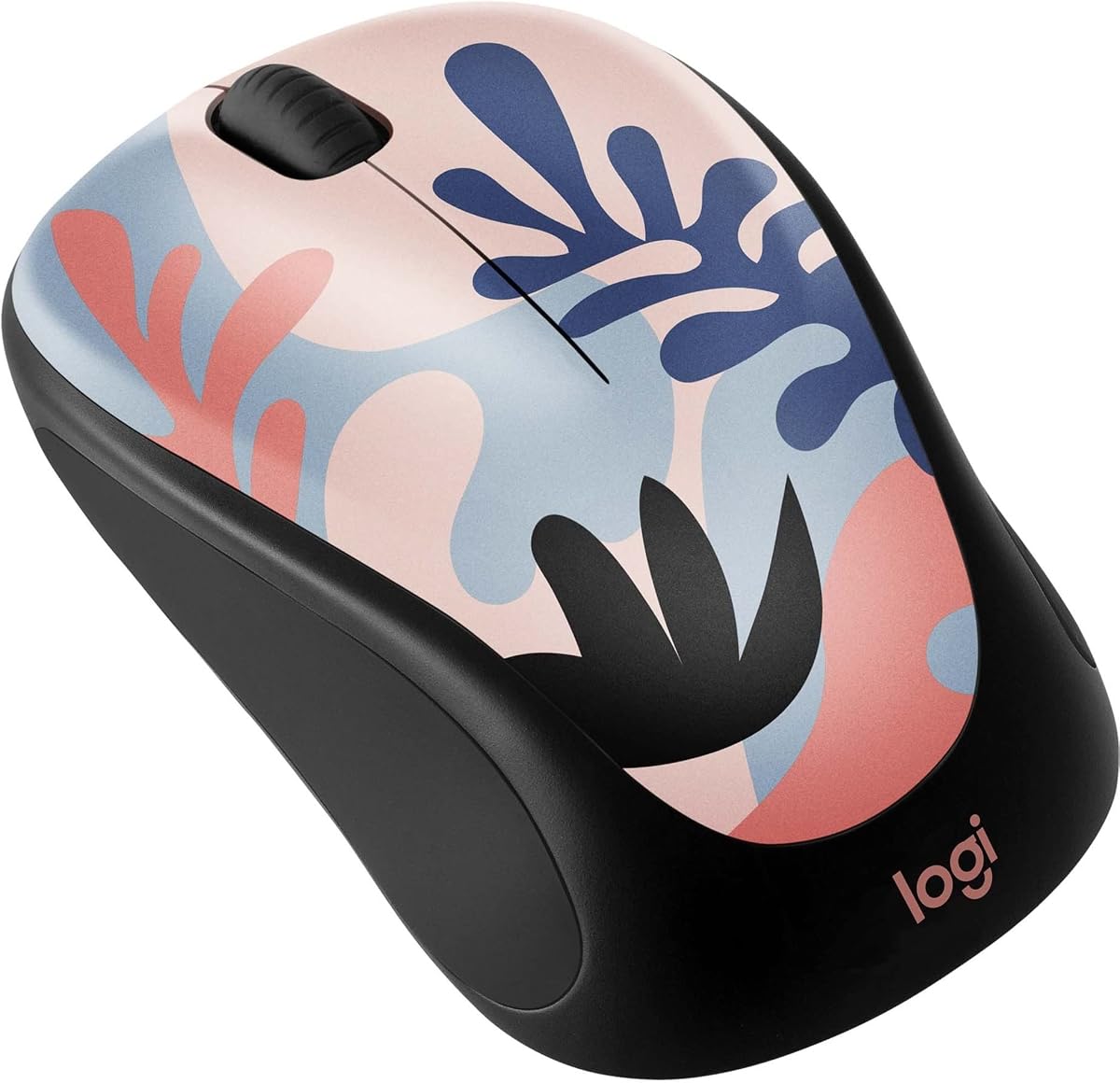
This mouse offers vibrant designs to create a personal desk setup. It features soft rubber side grips for extra comfort during extended use. The 10-meter wireless range provides total freedom from wires.
We may earn a commission when you buy through this link, at no additional cost to you.
The Unifying receiver allows pairing up to six compatible devices. Power-saving technology ensures up to 12 months of battery life on one cell. It works universally across Windows Mac Chrome OS and Linux.
The Unifying receiver requires a specific dongle which may not come with all bundles. It is pricier than basic generic options. However, the build quality and eco-friendly materials justify the investment.
Ideal for users who value brand quality and a tidy workspace. It combines style with the reliability you expect from a major manufacturer.
Use the Unifying receiver to connect multiple devices on one USB port.
Plastic parts include post-consumer recycled materials reducing environmental impact.
We may earn a commission when you buy through this link, at no additional cost to you.
This mouse features a kawaii workaholic cat design perfect for office workers. It offers dual mode Bluetooth and USB connectivity for flexible device support. The silent clicks are up to 90% quieter than standard mice.
We may earn a commission when you buy through this link, at no additional cost to you.
The ergonomic shape fits small to medium hands comfortably for daily use. It runs on a standard AA battery without needing a charging cable. It connects seamlessly across Windows Mac iPad and Android devices.
The specific meme design may not appeal to all aesthetic preferences. Battery replacement is needed periodically though it lasts months. These factors do not detract from its overall functionality and charm.
Perfect for cat lovers or anyone who enjoys workplace humor. It is a thoughtful gift that combines practicality with a touch of personality.
Use Bluetooth for tablets or USB for desktops with the simple toggle switch.
Silent click technology ensures you can work freely without disturbing others.
We may earn a commission when you buy through this link, at no additional cost to you.
Selecting the right accessory involves more than just color. Consider connectivity, comfort, and battery life to ensure a device meets your needs.
Decide between Bluetooth or USB receiver options. Bluetooth saves USB ports on modern laptops while receivers ensure stability.
Choose Bluetooth for thin devices or a receiver for older systems.
Comfort is key for long sessions. Look for contoured shapes that fit your palm and reduce strain on your wrist.
Ensure the mouse fits your hand size properly to avoid fatigue.
Consider rechargeable batteries versus disposable AA cells. Rechargeable options reduce waste but require charging cables.
Select based on your tolerance for carrying cables versus changing batteries.
Choose a shape that reflects your personality. Options range from floral and cartoon themes to sleek minimal designs.
Ensure the visual style matches your overall workspace aesthetic.
Silent clicks are essential for shared spaces. Check for silent button technology if you work in libraries or offices.
Look for models specifically marketed as silent or quiet.
Verify system support for Windows or Mac OS. Some buttons or features may not function on all platforms.
Double check specifications before purchasing to avoid issues.
Check the rated lifespan of the buttons. High-quality switches ensure the device lasts through years of daily use.
Prioritize models with a high click rating for longevity.
If you travel often, opt for a compact size. Look for features like stored receivers to keep your bag organized.
Choose a small model that fits easily into your laptop bag.
Connect your mouse by inserting the USB receiver or pairing via Bluetooth. Follow the device's pairing mode instructions to establish a secure link.
Keep the surface clean with a soft cloth. Dust and debris can interfere with optical tracking on your desk.
Change batteries promptly when the indicator light signals low power. For rechargeable models, avoid leaving them unused for months without charging.
Most of the featured models support macOS through Bluetooth or standard USB receivers. However, specific features like side buttons may not function depending on the operating system configuration.
Yes many models work with tablets running iPadOS or Android via Bluetooth. Ensure your tablet has a Bluetooth receiver or use a USB-C adapter for the dongle.
Battery life varies from months to years depending on usage. Some models include sleep modes to extend battery life during periods of inactivity.
Some models allow you to switch between different DPI levels for cursor speed. This feature is common in productivity focused mice to adapt to different tasks.
Yes most models undergo rigorous durability testing with millions of rated clicks. This ensures they withstand regular daily tasks over a long period of time.
Interference can sometimes affect wireless signals. Try moving the receiver to a front USB port or checking for nearby devices that might cause signal overlap.
Some modern models utilize recycled plastic materials in their construction. Additionally, rechargeable options help reduce the waste associated with disposable batteries.
Rechargeable models usually support simultaneous use while plugged in. However, battery powered models require a fresh battery to operate during use.
We have reviewed ten top options offering style and function. Each pick brings unique designs from cat themes to ergonomic comfort.
Prioritize comfort and connectivity to ensure the device matches your workflow. Silent clicks and durable builds are essential for long-term satisfaction.
Always check current pricing and availability before purchasing. Deals and stock levels change often across major retailers.