
VILONG Dual Layer Desk Clamp Power Strip
4.4Editor score
Dual layer desk clamp mounting system
Ten AC outlets with three USB ports
Seven hundred joule surge protection
Discover the top desk mounted outlet towers for organized power. This guide compares features, safety, and port options to help you choose the right charging
Modern workspaces demand efficient power solutions that keep cables managed and devices charged. Desk mounted outlet towers offer a vertical design that maximizes space while providing multiple access points for your electronics.
We evaluated leading models based on port variety, surge protection capabilities, and build quality. Our analysis focuses on real-world usability for offices, dorms, and home setups requiring reliable electricity distribution.
Each selection highlights specific strengths like retractable cords or high-wattage USB options. Prices and availability change frequently, so verify current details before purchasing your next charging station solution.
4.4Editor score

4.5Editor score

4.8Editor score
This side-by-side comparison highlights key specifications across all ten selected models. Review each entry to understand port counts, cord lengths, and unique mounting features before making your final decision.




This tower stands out with 230W total capacity across 14 ports. It holds a 4.5 rating due to its reliable fast charging performance for laptops and phones simultaneously.
We may earn a commission when you buy through this link, at no additional cost to you.
The two orange USB-C ports deliver up to 65W, ideal for powering laptops without bulky bricks. Six AC outlets handle larger devices like monitors, ensuring your entire setup stays active.
While the flat plug is thin at 0.31 inches, it still requires wall space. The lack of a retractable cord means you must manage the 5ft length manually to avoid tripping hazards.
Buy this if you need high power output in a small footprint. It balances speed and safety well for desks with multiple electronics needing immediate attention.
The 65W USB-C ports enable rapid laptop charging, reducing dependency on manufacturer adapters during busy work sessions.
Built-in overcurrent and overheat protection ensures your connected devices remain safe from electrical surges and temperature spikes.
We may earn a commission when you buy through this link, at no additional cost to you.
This retractable tower earns a perfect 5.0 rating for its innovative cord management. It simplifies clutter by winding the 6ft cord back into the base when not in use.
We may earn a commission when you buy through this link, at no additional cost to you.
With four AC outlets and two USB-C ports, it suits standard needs without overwhelming your desk. The mountable feet offer flexibility to fix it under desks or on walls.
The cord length might limit placement compared to fixed 6.5ft options. Also, lower surge protection than high-end models means it is best for light electronics.
Choose this for clean setups where cable mess is a concern. Its unique rewinding mechanism justifies the cost for anyone prioritizing organized spaces.
Pull out only the needed length and release to rewind, keeping floors clear and reducing trip risks effectively.
Mountable feet allow wall installation, reclaiming desk space for critical work tools while keeping power accessible.
We may earn a commission when you buy through this link, at no additional cost to you.
The Nano Power Strip delivers premium performance with 70W USB-C charging using GaN technology. It holds a 4.8 rating for its robust 1500J surge protection and sturdy clamp.
We may earn a commission when you buy through this link, at no additional cost to you.
Designed to replace bulky adapters, it keeps desks clean. The dual-zone layout separates top and bottom ports, making plug management easier for multiple users sharing the device.
It only fits desks between 0.6 and 1.8 inches thick. If your desk is curved or too thick, the clamp will not secure properly, limiting its use cases.
Invest in this for professional setups needing reliability. The high surge rating and fast laptop charging make it a top choice for power users.
GaN technology allows faster charging speeds with less heat generation, extending the lifespan of the power strip itself.
The clamp holds securely, enabling you to plug and unplug devices safely with one hand while the unit stays fixed.
We may earn a commission when you buy through this link, at no additional cost to you.
This model offers an impressive 16 total ports, accommodating extensive device needs. With a 4.7 rating, it excels in providing independent switches for managing power to different device groups.
We may earn a commission when you buy through this link, at no additional cost to you.
The vertical design saves horizontal desk space. It is rated for 1250W, handling multiple heavy appliances without overheating, making it ideal for dorm rooms or large offices.
The cord reaches 6.5ft but lacks a retractable mechanism, which might lead to tangling. Also, switches only cover four sections, meaning some groups of outlets share one control.
Pick this for environments with many devices. The independent switches allow safe power cycling for groups of electronics without unplugging them manually.
Four separated switches let you turn off unused electronics easily, saving energy and reducing heat generation in active rooms.
The vertical tower design keeps the footprint small, freeing up valuable desk surface for keyboards and writing materials.
We may earn a commission when you buy through this link, at no additional cost to you.
Rated 4.8, this tower emphasizes safety with a pure copper cord and fire-resistant PC shell. It ensures durability and safety against overheating in high-use home or office settings.
We may earn a commission when you buy through this link, at no additional cost to you.
The 16 ports support simultaneous charging for phones, tablets, and computers. The anti-slip mat on the bottom prevents the tower from sliding when heavy plugs are inserted.
The weight might make it harder to move frequently compared to lighter models. The design is functional but lacks aesthetic refinement found in higher-end premium brands.
Choose this for safety-conscious buyers on a budget. The material quality ensures long-term reliability without requiring frequent replacements.
Pure copper conductors reduce resistance and heat build-up, ensuring efficient power delivery to connected devices over time.
The PC shell resists flames up to high temperatures, adding an extra layer of fire safety for your workspace.
We may earn a commission when you buy through this link, at no additional cost to you.
This tower solves adapter crowding with 16 wide-spaced AC outlets. It holds a 4.6 rating for its ability to handle multiple large transformers without blocking adjacent sockets.
We may earn a commission when you buy through this link, at no additional cost to you.
With 21 total ports, it covers every device in a shared space. The compact vertical profile ensures it takes up minimal floor space while delivering high power capacity.
Surge protection is standard, which may be insufficient for sensitive electronics during severe storms. The lower rating suggests potential quality variations compared to top brands.
Select this for rooms with many large adapters. The wide spacing prevents interference between bricks, ensuring all devices connect securely.
Generous spacing between sockets allows bulky power bricks to fit without overlapping, ensuring stable connections for all plugged-in devices.
Integrated lightning protection shields connected gear from sudden voltage spikes caused by weather, keeping your hardware safe.
We may earn a commission when you buy through this link, at no additional cost to you.
Rated 4.8, this tower features an ultra-thin flat plug that fits flush against walls. The 45-degree right angle ensures nearby outlets remain accessible even when plugged in.
We may earn a commission when you buy through this link, at no additional cost to you.
It offers 14 ports across 11 AC outlets and 3 USB ports. The grey finish blends well in modern office environments, providing a neutral look for your workspace.
The limited number of USB ports might not suit users with many small devices. Also, the grey color is fixed, offering no customization for different interior styles.
Buy this for wall outlets behind furniture. The flat design prevents the tower from blocking sockets above or below it on standard duplex outlets.
The 45-degree angled plug allows other outlets to remain usable, maximizing the utility of a single wall socket.
Anti-slip rubber feet at the base keep the tower secure on smooth floors, reducing the risk of it tipping over.
We may earn a commission when you buy through this link, at no additional cost to you.
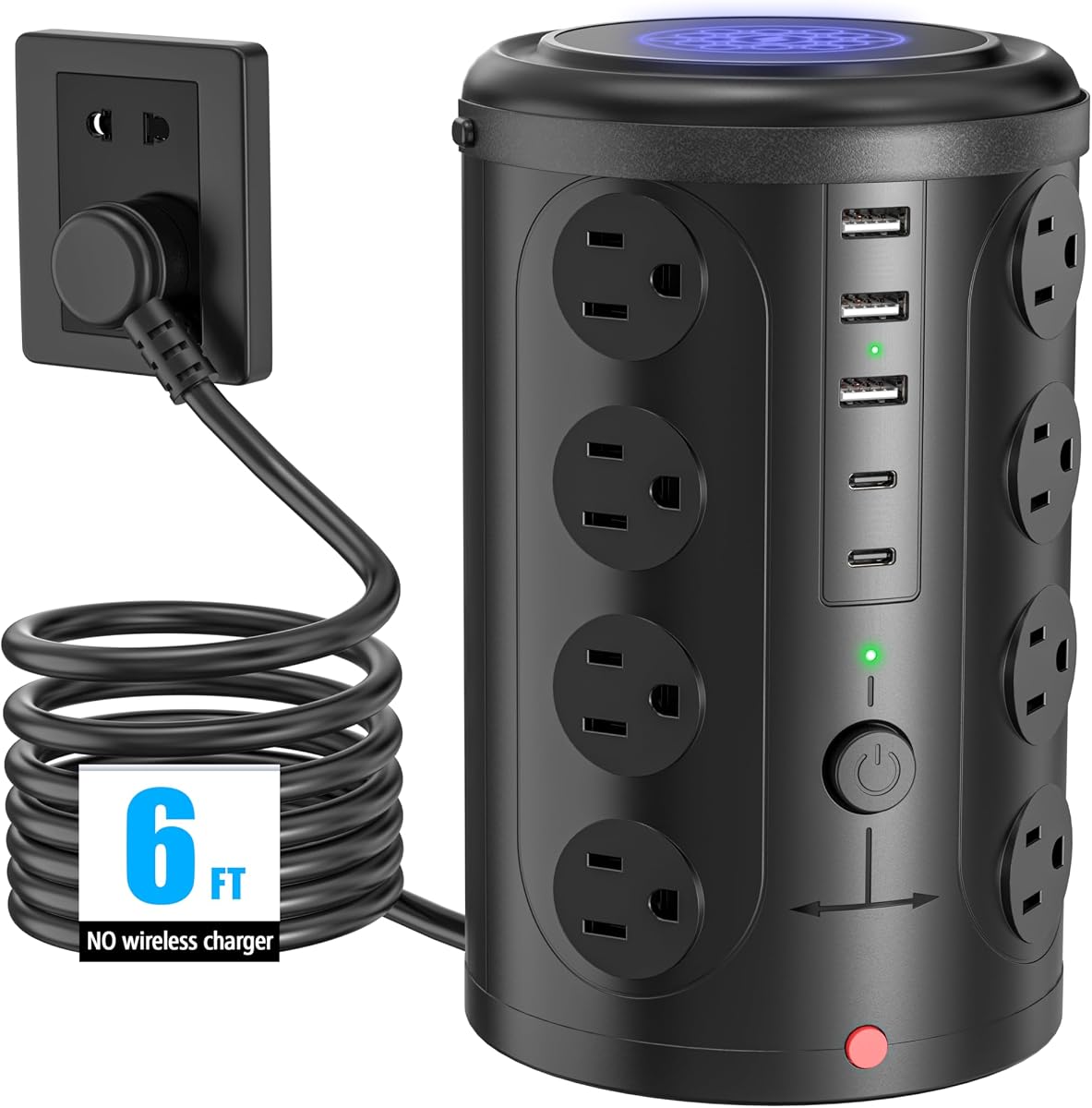
This clamp-on tower features a dual layer design that optimizes under-desk space. It holds a 4.4 rating for its ease of installation and ability to reduce cable clutter effectively.
We may earn a commission when you buy through this link, at no additional cost to you.
With 10 AC outlets and three USB ports, it handles standard office loads. The clamp fits desks up to 1.6 inches thick, making it versatile for many workstations.
The 700J surge protection is lower than premium models, offering basic safety. The 20W USB-C is sufficient for phones but may not fast charge laptops.
Install this under a desk for a clean top surface. It keeps cables hidden while keeping power access points reachable for laptops and monitors.
The two-layer structure allows vertical stacking of plugs, keeping the desk surface completely free of power strips.
Simply clamp and twist to secure; no tools are needed, allowing quick setup in office or home environments.
We may earn a commission when you buy through this link, at no additional cost to you.
This tower earns a 4.7 rating for its 1800J surge protection, offering high safety for your electronics. It balances port variety with a solid build for daily use.
We may earn a commission when you buy through this link, at no additional cost to you.
With 12 AC outlets and 4 USB ports, it handles diverse needs. The 6ft cord allows placement flexibility without restricting movement too much across the room.
The USB port output specs are not fully detailed for fast charging. If you rely heavily on USB-C laptops, verify compatibility with your specific device requirements.
Choose this for general protection needs. The surge rating is robust, making it a reliable choice for shared workspaces with sensitive equipment.
High surge capacity protects connected devices from voltage spikes, ensuring your gear remains functional even during electrical surges.
The flat plug sits flush against the wall, preventing obstruction of nearby sockets and saving space behind furniture.
We may earn a commission when you buy through this link, at no additional cost to you.
This model earns a 4.8 rating for its stylish braided fabric cord that adds a decorative element. It offers 16 ports, making it a great budget option for aesthetic-focused spaces.
We may earn a commission when you buy through this link, at no additional cost to you.
The 1080J surge protection provides solid safety for everyday use. Its vertical design keeps the footprint small, ensuring it blends seamlessly into your existing office decor.
The plug is slightly thicker than 0.30-inch options, so check tight wall clearance. Fabric cords are durable but may show wear over time in high-traffic areas.
Pick this for budget-conscious buyers who value looks. The fabric cable ensures the tower stands out aesthetically while delivering reliable power management.
The fabric outer layer prevents tangling and adds a touch of elegance to your desk setup without adding extra cost.
A small footprint allows placement in tight corners, maintaining visual clarity while powering multiple essential devices simultaneously.
We may earn a commission when you buy through this link, at no additional cost to you.
Choosing the right tower requires evaluating port counts, safety ratings, and physical design. This guide outlines the critical factors to ensure you select a model that fits your specific workspace needs.
Evaluate the number of AC outlets and USB ports available. A higher total count allows you to power multiple monitors, laptops, and phones without needing additional splitters.
Look for towers with at least 12 AC outlets if you have many devices. This ensures future-proofing against the growing number of electronics in your workspace.
Surge protection is measured in joules. Higher joules like 1500J or more provide better defense against electrical spikes that can damage sensitive computer components.
Prioritize towers with a rating above 1000J. This ensures your valuable electronics remain safe during storms or grid fluctuations.
USB ports vary in output. USB-C ports supporting PD (Power Delivery) can charge laptops faster. Check wattage ratings to match your device requirements.
Choose towers with 65W or higher USB-C ports for laptops. This eliminates the need for bulky proprietary chargers on your desk surface.
Standard cord lengths range from 5ft to 6.5ft. Longer cords allow better placement flexibility for outlets that are far from your desk.
Retractable cords keep the floor clean but may lack durability. Fixed cords are sturdier but require careful management to prevent tripping hazards.
Flat plugs are essential for outlets behind furniture. They allow the tower to sit flush against the wall without blocking other sockets.
Select a 45-degree angled or flat plug design. This ensures you can still use the socket above or below the one your tower occupies.
Some towers come with desk clamps for under-desk mounting. This saves surface space on your desk and keeps cables organized effectively.
If you lack desk space, choose a clamp-on model. It secures the tower under the desktop edge for easy access without clutter.
Overload protection and individual switches help manage power safely. Look for fire-resistant materials to reduce risks of overheating during prolonged use.
Verify the tower has built-in circuit breakers. This shuts down power automatically if usage exceeds safe limits, protecting your devices.
Stable construction prevents tipping. Towers with rubber feet or heavy bases are less likely to slip when plugging in heavy adapters.
Choose towers with reinforced junctions where the cord meets the tower. This prevents wire damage and ensures a longer operational lifespan.
Place the tower on a flat, stable surface near your desk. Ensure the cord reaches the wall outlet without stretching or creating a tripping hazard for anyone walking nearby.
Plug high-draw devices like monitors into the main AC outlets. Use USB ports for charging smaller gadgets like phones to prevent adapter clutter on your workspace.
Regularly check the plug and cord for wear. Dust the tower with a dry cloth and avoid overloading it with devices that exceed the total wattage capacity.
Yes, many models include USB-C ports with Power Delivery. Look for 65W or higher output to ensure your laptop charges quickly without the original brick.
Clamp models are designed to be stable. They lock firmly to desk edges and allow one-hand operation, preventing the tower from shifting during use.
Flat plugs are designed to sit flush against the wall. This allows other plugs to remain accessible in adjacent sockets, unlike standard bulky plugs.
Ratings above 1000J are recommended for electronics. Higher joule counts provide stronger defense against voltage spikes caused by lightning or grid issues.
Use retractable models or cable ties to organize cords. Keep the tower vertical to minimize floor space usage and reduce tripping risks.
Most have safety features like automatic shutoff. However, unplugging non-essential devices at night is a good habit to save energy and reduce risks.
The top picks like the TenTrend Tower and Anker Nano offer excellent speed and safety. These models balance port variety with reliable surge protection for most user needs.
Prioritize surge protection and USB wattage when shopping. Safety and fast charging speed ensure your equipment lasts longer and works efficiently daily.
Remember to check current prices and availability before purchasing. Models may vary in stock depending on regional demand and seasonal sales.