
Amazon Basics Height Adjustable
4.6Editor score
3-Level stackable design
Lightweight ABS plastic
Tapered surface profile
This guide compares the top 10 desktop monitor risers for 2026, evaluating build quality, ergonomics, storage options, and value for home and office workspaces.
A desktop monitor riser elevates your screen to eye level, reducing neck strain and freeing up valuable desk space. Finding the right one depends on your setup size, weight needs, and desired storage features.
We evaluated ten highly rated options based on stability, adjustability, material durability, and user feedback. Each product was assessed for its ability to support various devices while maintaining a clean, organized workspace.
Each pick highlights key strengths, potential trade-offs, and ideal use cases to help you decide. Please note that prices and availability may fluctuate, so check the current listings before purchasing.
4.6Editor score

4.7Editor score

4.6Editor score
This side-by-side comparison highlights key specifications for each model, including dimensions, weight capacity, materials, and unique features to help you quickly identify the best fit for your needs.



The WALI Computer Monitor Stand stands out as a top contender for its balance of durability and functionality. With a 4.7 rating, users appreciate its robust metal build and adjustable height settings that cater to various ergonomic needs.
We may earn a commission when you buy through this link, at no additional cost to you.
Its large 14.6 by 9.3-inch shelf supports most screens and laptops, while the vented holes ensure devices stay cool during extended use. The open space underneath effectively reduces desk clutter by holding keyboards and accessories.
While assembly requires some effort and the stand is heavier than plastic alternatives, the stability it provides justifies these minor inconveniences. The rubber pads protect your desk surface from scratches or slipping during operation.
Ideal for home or office users needing a reliable riser, this model offers excellent value. It is particularly suited for those who prioritize long-term durability and flexible viewing heights over lightweight portability.
Three distinct height levels allow you to customize the monitor position for optimal neck and back comfort during long work sessions.
Vented holes on the shelf promote airflow, preventing overheating and keeping connected devices running efficiently.
We may earn a commission when you buy through this link, at no additional cost to you.
The TEAMIX 20 Inch Monitor Stand offers a stylish wood finish that complements modern decor while providing solid support for monitors under 50 inches. Users praise its sturdy MDF board construction and high weight capacity.
We may earn a commission when you buy through this link, at no additional cost to you.
Its ergonomic design helps reduce neck and eye strain by raising screens to a comfortable viewing level. The 20-inch width accommodates most laptops and monitors, with enough space below for storing keyboards or notebooks.
Although it lacks height adjustment options, its fixed 4-inch lift is sufficient for many users. The black finish resists wear well, though it may show scratches if not handled carefully during cleaning or relocation.
This stand is ideal for those seeking a blend of aesthetics and functionality without complex assembly. It works well in home offices where a clean, professional look is prioritized alongside practical storage solutions.
High-quality MDF wood ensures durability and can support up to 80 pounds without bending or wobbling.
The sleek black finish blends seamlessly with most home or office decor styles for a polished look.
We may earn a commission when you buy through this link, at no additional cost to you.
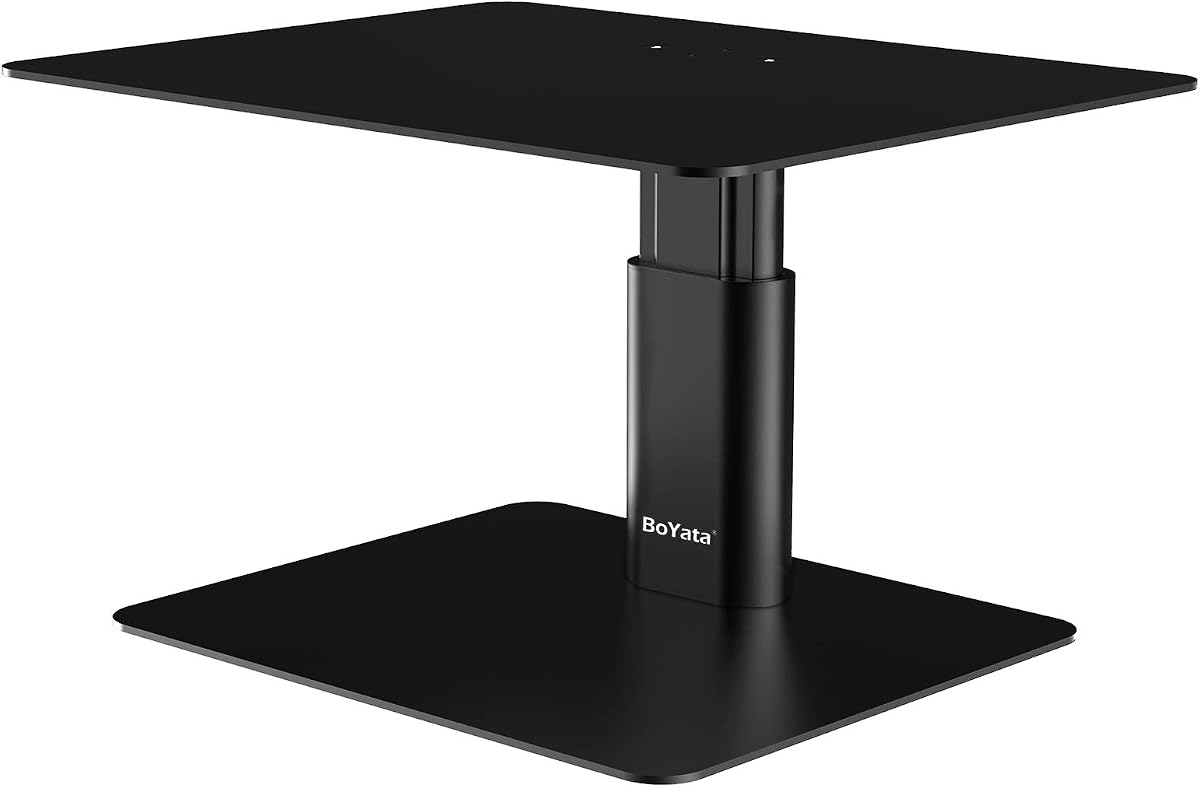
The BoYata Monitor Stand distinguishes itself with an adjustable twist knob mechanism that allows precise height customization. This feature appeals to users who want flexibility without compromising on stability or build quality.
We may earn a commission when you buy through this link, at no additional cost to you.
Made from durable metal, it supports up to 33 pounds, making it suitable for most standard monitors and laptops. The skidproof pads ensure the stand remains stable on any surface, preventing accidental movement.
While the weight capacity is lower than some competitors, the design prioritizes adjustability and sleek aesthetics. Assembly is straightforward but requires a screwdriver, which is included in the package for convenience.
This model is best for individuals seeking a compact yet adjustable riser that enhances posture. It fits well in smaller workspaces where precise ergonomic positioning is more important than heavy-duty support.
The twist knob allows you to fine-tune the monitor height to your exact comfort preference easily.
Sufficient clearance between metal plates provides storage space for keyboards without obstructing your view.
We may earn a commission when you buy through this link, at no additional cost to you.
The Amazon Basics Height Adjustable Monitor Stand provides an affordable solution for basic ergonomic needs. Its 3-level stackable design lets you choose between three height options using detachable legs for flexibility.
We may earn a commission when you buy through this link, at no additional cost to you.
Made from high-quality ABS plastic, it is lightweight yet durable enough for standard monitors and laptops. The tapered design ensures stability, while non-skid feet keep the stand secure on flat surfaces.
Though the weight capacity is lower than metal alternatives, it suits most home office setups. Users appreciate its portability and ease of setup, making it ideal for those who move frequently or have limited space.
This stand is perfect for budget-conscious buyers seeking functionality over heavy-duty features. It effectively reduces neck strain while maintaining a clean, unobtrusive look on any desk or workstation.
Three adjustable leg configurations allow you to set the stand height to 2.87, 4.2, or 4.8 inches.
ABS plastic construction makes it easy to transport or reposition without heavy lifting or tools.
We may earn a commission when you buy through this link, at no additional cost to you.
The YAOHUOO Dual Monitor Stand is designed for users needing ample space for multiple devices. With a 39-inch wide platform, it comfortably supports two monitors, laptops, or even a TV for shared viewing.
We may earn a commission when you buy through this link, at no additional cost to you.
Its heavy-duty steel legs ensure rock-solid stability, capable of supporting up to 100 pounds. This makes it ideal for larger screens or heavier equipment that might wobble on lighter stands.
While it demands more desk space, the elevated design creates substantial storage room underneath. The wooden finish adds a touch of elegance, blending functionality with a warm, professional aesthetic.
This stand suits professionals or gamers with extensive setups who prioritize capacity and stability. Its quick assembly and durable construction make it a reliable long-term investment for any serious workspace.
The 38.6-inch length accommodates multiple screens side by side without feeling cramped or unstable.
Heavy-duty steel footing prevents shaking or collapsing, even under significant weight loads.
We may earn a commission when you buy through this link, at no additional cost to you.
This 2-pack of monitor risers offers exceptional value for those needing multiple elevations or backup units. Each stand features three adjustable height settings that can be customized easily without tools for quick setup.
We may earn a commission when you buy through this link, at no additional cost to you.
The metal shelf is constructed from cold-rolled steel with a waterproof coating, ensuring durability against rust or scratches. Its 150 heat dissipation holes actively prevent devices from overheating during heavy usage.
Users appreciate the spacious platform and rubber pads that protect desk surfaces. While some versions lack a phone holder, the core functionality of storage and ergonomic lift remains highly effective.
Ideal for offices with multiple workstations or shared desks, this pack allows flexible arrangement. It provides robust support and excellent airflow, making it suitable for laptops, printers, and monitors alike.
Simply screw legs onto the platform without tools, allowing setup in under 30 seconds for convenience.
150 ventilation holes ensure devices stay cool, extending their lifespan and maintaining performance.
We may earn a commission when you buy through this link, at no additional cost to you.
The Klearlook Foldable Stand offers unique width adjustments to fit various workstations without permanent commitment. Its foldable design allows you to expand or reduce the footprint based on your immediate needs.
We may earn a commission when you buy through this link, at no additional cost to you.
With a hidden storage drawer and phone holder, it keeps essentials organized and within easy reach. The white finish looks clean and modern, though it may require careful handling to avoid visible marks.
Users love that it requires no assembly, providing immediate utility upon unboxing. The rubberized legs ensure stability, even when holding ultrawide monitors or heavier equipment securely in place.
This stand is perfect for those who value versatility and convenience. It suits dynamic work environments where desk space and storage needs may change frequently throughout the day.
Adjustable widths of 16.5, 18.5, and 20.5 inches let you adapt the stand to your desk layout.
A hidden drawer and phone holder keep your workspace tidy and essentials instantly accessible.
We may earn a commission when you buy through this link, at no additional cost to you.
The OPNICE Desk Organizer combines a monitor riser with functional storage features like hanging pen holders and a drawer. This all-in-one approach declutters desks and keeps office supplies organized efficiently.
We may earn a commission when you buy through this link, at no additional cost to you.
Premium metal construction ensures the stand remains stable even with heavy monitors. The ergonomic design raises screens to eye level, promoting better posture during long work sessions.
Users appreciate that it requires no installation, allowing for instant workspace optimization. The sleek black design blends well with most professional environments while providing practical utility.
This model suits office professionals who prioritize organization alongside ergonomics. Its combination of storage and support makes it an excellent choice for keeping desks tidy and productive.
Hanging pen holders and a drawer provide convenient spots for pens, notepads, and small accessories.
No installation is required, so you can start organizing your workspace right away without tools.
We may earn a commission when you buy through this link, at no additional cost to you.
The WESTREE Dual Monitor Stand features a distinctive rustic brown wood finish paired with thick steel legs. This combination offers a unique look that stands out in both home and office settings.
We may earn a commission when you buy through this link, at no additional cost to you.
Its heavy-duty steel construction ensures stability, while anti-slip pads prevent any sliding during use. The design includes pre-drilled holes and tools, making assembly straightforward for most users.
Users praise its capacity to support two monitors or larger devices securely. The elevated platform provides ample space below for storing keyboards, printers, or other office essentials neatly.
This stand is ideal for those seeking a blend of style and function. Its patented design ensures durability, making it a solid choice for long-term use in demanding work environments.
The rustic brown wood adds a unique, warm aesthetic that complements modern or classic decor styles.
Thick solid steel legs provide strong bearing load capacity for multiple monitors or heavy equipment.
We may earn a commission when you buy through this link, at no additional cost to you.
The gianotter Dual Monitor Stand offers instant utility with no assembly required, saving time and effort. Its magnetic pen holders and drawer provide clever solutions for keeping desk accessories organized and accessible.
We may earn a commission when you buy through this link, at no additional cost to you.
Crafted from high-strength metal, the stand ensures durable support for dual monitors or large laptops. The design prioritizes aesthetics and functionality, transforming cluttered areas into tidy, efficient workspaces.
While it lacks height adjustment, the ergonomic lift still reduces neck strain for most users. The magnetic holders are a unique feature that keeps writing tools within easy reach without occupying extra space.
This model is perfect for users who want quick setup and clean design. It suits small offices or home workstations where minimizing assembly steps and maximizing organization are key priorities.
Simply unbox the stand and place it on your desk for immediate use without tools or instructions.
Two magnetic holders keep pens and small items secure and ready to use throughout your day.
We may earn a commission when you buy through this link, at no additional cost to you.
Selecting the right desktop monitor riser involves considering several key factors to ensure it meets your ergonomic and storage needs effectively.
Ensure the stand can support your monitor or laptop weight safely. Models range from 22 to 100 pounds, so match the capacity to your devices to avoid instability or damage.
Always check the manufacturer's weight limit and allow a safety margin for accessories or heavier screens.
Look for stands with adjustable height or width if your setup changes frequently. Fixed models offer simplicity, while adjustable ones provide better ergonomic customization for different users.
Adjustable stands are ideal if multiple people share the workspace or if you need flexibility for various screen sizes.
Metal stands tend to be more durable and stable than plastic ones. Wood options add aesthetic appeal but may require more care to maintain their finish over time.
Choose materials that balance durability with your decor preferences and expected daily usage intensity.
Consider how much room you need underneath for keyboards, notebooks, or other accessories. Some stands include drawers or shelves, while others offer open space for flexible storage.
If desk space is limited, prioritize stands with built-in organizational features like drawers or pen holders.
Some stands come pre-assembled or require minimal tools, saving time during setup. Others may need more effort but offer greater customization or sturdier construction.
If you prefer convenience, opt for no-assembly or tool-free models that are ready to use immediately.
Measure your desk space and screen dimensions before purchasing. Ensure the stand fits comfortably without overcrowding your workspace or obstructing other items.
Larger stands support dual monitors but require more surface area, so verify compatibility with your desk layout.
Vented or perforated shelves help prevent overheating of devices by allowing airflow. This is particularly important for laptops or equipment that generates heat during prolonged use.
Prioritize stands with holes or open designs if heat management is a concern for your setup.
Choose a finish and color that match your existing decor. Black, white, or wood tones can enhance the visual appeal of your workspace while maintaining functionality.
A cohesive look boosts productivity by creating a pleasing and professional environment.
Place the stand on a flat, stable surface to ensure it does not wobble or shift during use. Check that all legs are evenly supported and any adjustable parts are securely tightened before placing your device.
Clean the stand regularly with a soft, dry cloth to remove dust and prevent scratches. Avoid harsh chemicals, especially on wood or coated metal surfaces, to maintain the finish and durability over time.
Periodically inspect screws, knobs, or legs for wear or looseness. Tighten any loose parts promptly to maintain stability and extend the lifespan of your desktop monitor riser.
The ideal height raises your screen so the top is at or slightly below eye level, typically 4 to 6 inches off the desk. This reduces neck strain and promotes better posture during extended work sessions.
Many risers support ultrawide monitors if their weight and dimensions fit within the stand's limits. Check the width and weight capacity before purchasing to ensure compatibility and avoid instability.
Most stands include necessary tools, but some pre-assembled models do not. Always review product details to confirm if tools are provided or if you need to prepare your own screwdriver or wrench.
Adjustable risers offer better ergonomic flexibility for shared workspaces or changing setups. While slightly more expensive, they provide long-term value by adapting to different user preferences easily.
Choose stands with rubber pads or non-slip feet to secure them on your desk. If needed, add extra grip pads underneath to increase friction and prevent accidental movement during use.
Yes, most risers work well for laptops, printers, or even small TVs. Ensure the device weight and size fit the platform, and adjust the height to maintain a comfortable viewing angle.
Wipe metal stands with a damp cloth occasionally to remove dust and fingerprints. Avoid abrasive cleaners to protect the finish, and check for rust if the stand is used in humid environments.
Wooden stands often offer a more premium look and higher durability than plastic. However, plastic models are lighter and less expensive, so choose based on your budget and aesthetic preferences.
The WALI Computer Monitor Stand, Amazon Basics Height Adjustable, and YAOHUOO Dual Monitor Stand stand out as top choices for their balance of features, durability, and value. Each model caters to different needs, from budget-friendly simplicity to robust multi-monitor support.
Prioritize ergonomic design, weight capacity, and storage options based on your specific workspace requirements. Whether you need adjustability, aesthetics, or organizational features, there is a suitable option among these reviewed models.
Remember to verify current listings and availability before purchasing, as prices and stock may change. Investing in the right desktop monitor riser enhances comfort, productivity, and organization for your daily work routine.