
MELOGAGA RGB
4.2Editor score
7 color RGB lighting
Ultra compact design
Inline volume control
This guide compares the ten best cheap PC speakers for 2026, evaluating sound quality, build, connectivity, and value for budget conscious desktop users.
Finding affordable audio that does not compromise on quality is a common challenge for budget conscious PC users. Cheap PC speakers must deliver clear sound, reliable connectivity, and durable construction without draining your wallet. This guide explores ten top rated options that balance performance and price effectively for any setup.
We analyzed user reviews, technical specifications, and real world performance metrics to curate this list. Our comparison focuses on sound clarity, bass response, ease of use, and overall build quality. Each product was selected to represent a distinct value proposition for different desktop and laptop configurations.
Each pick below highlights key strengths, weaknesses, and ideal use cases to help you decide quickly. We update our recommendations regularly to reflect the latest market offerings and user feedback. Note that availability and pricing may change over time so verify details before purchasing.
4.2Editor score

4.6Editor score

4.2Editor score
The following table provides a side by side overview of all ten selected models. It highlights key specifications and distinctive features to help you compare options at a glance.



The Creative Pebble 2.0 stands out as a top choice for budget desktop users seeking quality sound. Its high user ratings reflect consistent performance in delivering clear audio across various applications. The design prioritizes space efficiency while maintaining a modern aesthetic that fits any workspace.
We may earn a commission when you buy through this link, at no additional cost to you.
Its 45 degree elevated drivers and far field tuning technology project sound directly toward the listener. This setup enhances clarity and creates a more immersive experience without needing additional amplification. The single USB cable simplifies power and audio delivery, reducing cable clutter significantly.
While it lacks an auxiliary input and may have limited volume headroom for large rooms, these trade-offs are acceptable for most desktop setups. The front facing controls are intuitive and allow quick adjustments without reaching behind the monitor. It remains a reliable option for everyday media consumption.
Buyers should choose this speaker if they value simplicity and strong audio performance in a small package. It suits laptops, monitors, and desktops equally well. For those seeking the best balance of price and quality, this model offers a compelling recommendation without compromising on core features.
The compact footprint allows placement on crowded desks without sacrificing audio output or visual appeal.
Rear facing passive radiators deliver deep bass that exceeds expectations for such a small form factor.
We may earn a commission when you buy through this link, at no additional cost to you.
The MELOGAGA RGB speaker offers a budget friendly entry into enhanced desktop audio with stylish lighting. Its compact design and plug and play functionality make it ideal for users who want immediate improvements. The dual 3W drivers provide crisp sound suitable for music and games.
We may earn a commission when you buy through this link, at no additional cost to you.
The 7 color LED backlighting adds a dynamic visual element to any gaming or work setup. Inline volume control allows for quick adjustments without cluttering the desk. Despite its low cost, the audio remains balanced and distortion free at typical listening levels.
Construction is basic compared to higher end models, and bass response is limited due to the small size. However, the price point justifies these compromises for those prioritizing visual flair and portability. It is perfect for secondary setups or budget constrained buyers.
Choose this speaker if you need affordable audio that complements a RGB themed workstation. It works well with laptops and small monitors. The combination of sound and light at this price makes it a standout option for budget conscious shoppers seeking value.
Dynamic RGB lighting cycles through colors to enhance the atmosphere of your workspace without complex controls.
No drivers are needed as the USB connection handles both power and audio seamlessly for instant use.
We may earn a commission when you buy through this link, at no additional cost to you.
The FUNLOGY Speaker delivers premium performance in a compact form factor designed for desktop environments. Its 14W total output provides impressive volume and clarity for a small device. The 30 degree tilt optimizes sound direction, ensuring an immersive experience even at close range.
We may earn a commission when you buy through this link, at no additional cost to you.
Gold plated AUX inputs minimize signal noise for consistent audio quality during use. The Japanese inspired design focuses on build quality and customer support, including a solid warranty. It connects easily via USB and auxiliary inputs without requiring drivers or complex setup procedures.
While it is slightly more expensive than basic models, the enhanced performance and durability justify the investment. The small footprint means it fits any desk but may lack the room filling power of larger towers. It is best for users seeking refined audio in a small package.
Buyers looking for reliable, high quality sound with aesthetic appeal should consider this model. It suits gaming consoles, laptops, and monitors alike. The balance of power, design, and warranty support makes it a top premium choice among cheap PC speakers.
The upward tilt directs sound toward your ears for better clarity and immersion without moving the speakers.
Award winning design and customer support ensure peace of mind with durable construction and reliable performance.
We may earn a commission when you buy through this link, at no additional cost to you.
This soundbar offers a unique solution for mounting audio directly to your monitor to save desk space. The adaptive channel switching ensures correct left and right positioning regardless of clamp orientation. Touch controls provide easy muting and volume adjustment without reaching for software.
We may earn a commission when you buy through this link, at no additional cost to you.
It includes a USB C adapter for compatibility with modern laptops and tablets. Dual passive radiators enhance bass depth for a fuller listening experience. The loud volume output makes it suitable for busy environments or gaming sessions requiring clear audio cues.
Users must ensure their audio drivers are up to date for proper functionality. The clamp works well on specific monitor types but may not fit all bezels. While versatile, it requires some setup to ensure stable mounting and optimal audio performance on various devices.
Ideal for users who want to declutter their workspace without sacrificing audio quality. It works well with gaming consoles and desktops alike. The innovative clip design and robust sound make it a strong option for monitor centric setups.
The patented clamp holds the speaker securely on the monitor saving valuable desk real estate for peripherals.
USB C support ensures compatibility with newer devices without requiring additional adapters or power sources.
We may earn a commission when you buy through this link, at no additional cost to you.
Amazon Basics delivers a no fuss USB speaker that is perfect for portable and office use. Its compact size fits easily on crowded desks while remaining lightweight for travel. The simple front volume control includes an on and standby function for quick access.
We may earn a commission when you buy through this link, at no additional cost to you.
A headphone jack allows you to connect external headphones without disconnecting the speakers. The frequency range covers standard audio needs though power is limited to 2.2 watts total. Setup requires no drivers as it works immediately via standard USB ports.
While not suitable for large rooms, it delivers clear dialogue and background audio for casual use. The build is functional rather than premium but provides reliability for everyday tasks. It is best for users prioritizing convenience and portability over high fidelity sound.
Choose this for a secondary desk or laptop setup where simplicity is key. The headphone port adds versatility for shared workspaces. Its straightforward design and low price make it a practical choice for budget focused buyers needing basic audio.
Standard USB and headphone jacks ensure it works with almost any computer or laptop without special configuration.
Small dimensions allow placement near keyboards or monitors without obstructing workspace or requiring extra cables.
We may earn a commission when you buy through this link, at no additional cost to you.
This pair offers classic two speaker stereo sound with a focus on reliability and ease of use. The bottom radiator helps produce springy bass that enhances media playback without a subwoofer. A metal finish adds durability and a professional look to the desk.
We may earn a commission when you buy through this link, at no additional cost to you.
In line volume control allows for adjustments without touching the computer settings. The blue LED lights provide a subtle visual cue when powered on. Cables are designed to avoid clutter and remain organized next to the PC or monitor for neatness.
While the design is fixed and may not fit all desk layouts, the performance is consistent for the price. It requires USB for power and an auxiliary cable for audio input which may increase cable count. However, it remains a robust option for standard setups.
Buyers should consider this if they need standard stereo performance with minimal fuss. It suits home offices and gaming stations alike. The combination of bass quality and build durability ensures long term use without needing frequent replacements or upgrades.
A bottom radiator enhances low frequencies to provide richer sound than typical compact USB powered speakers offer.
Metal coating and scratch free base protect against wear keeping the speakers looking new over time.
We may earn a commission when you buy through this link, at no additional cost to you.
This upgraded model provides a streamlined experience with audio and power over a single USB cable. Dual high excursion drivers enhance dynamic range and bass clarity for an immersive experience. It supports Windows, macOS, Linux, and Chrome OS for broad versatility.
We may earn a commission when you buy through this link, at no additional cost to you.
The soundbar design saves space while delivering stereo separation and louder volumes than smaller units. Distortion remains low even at higher volumes making it suitable for intense gaming sessions. Setup involves selecting the device in system settings and plugging in.
It lacks an auxiliary input so all devices must support USB audio. The compact form fits well on tight desks but may not suit users preferring traditional pairs. Despite this, the sound quality and ease of use stand out among competitors in its class.
Ideal for users who want a clean desk with strong audio performance. It works seamlessly with modern laptops and desktops. The enhanced bass and multi OS support make it a practical and powerful choice for various computing environments.
Single USB cable handles both power and audio eliminating the need for additional audio jacks or adapters.
Built in drivers move more air to produce louder sound and deeper bass without audible distortion.
We may earn a commission when you buy through this link, at no additional cost to you.
These compact column shaped speakers offer a neat appearance that fits modern desks. High quality plastics and matte metal panels provide a refined look. The anti slip foot pads ensure stability during use and protect your desk from scratches.
We may earn a commission when you buy through this link, at no additional cost to you.
Plug and play setup via USB and 3.5mm audio ensures immediate usability. The in line volume control allows for easy adjustments without interrupting work. Sound output is crisp and distortion free suitable for movies and music playback.
The design prioritizes space saving without significant compromise to audio quality. While bass is not as deep as larger models, it is sufficient for casual listening. Cable lengths allow for flexible placement between speakers to suit different desk sizes.
Buyers seeking a modern look with reliable performance will appreciate this model. It suits home offices and dorm rooms well. The balance of design and function makes it a practical choice for users wanting tidy desks.
Slim columns fit easily in tight spaces without obstructing monitors or peripheral equipment on the desk.
Glued cables prevent tangling and keep the area around your computer looking organized and clutter free.
We may earn a commission when you buy through this link, at no additional cost to you.
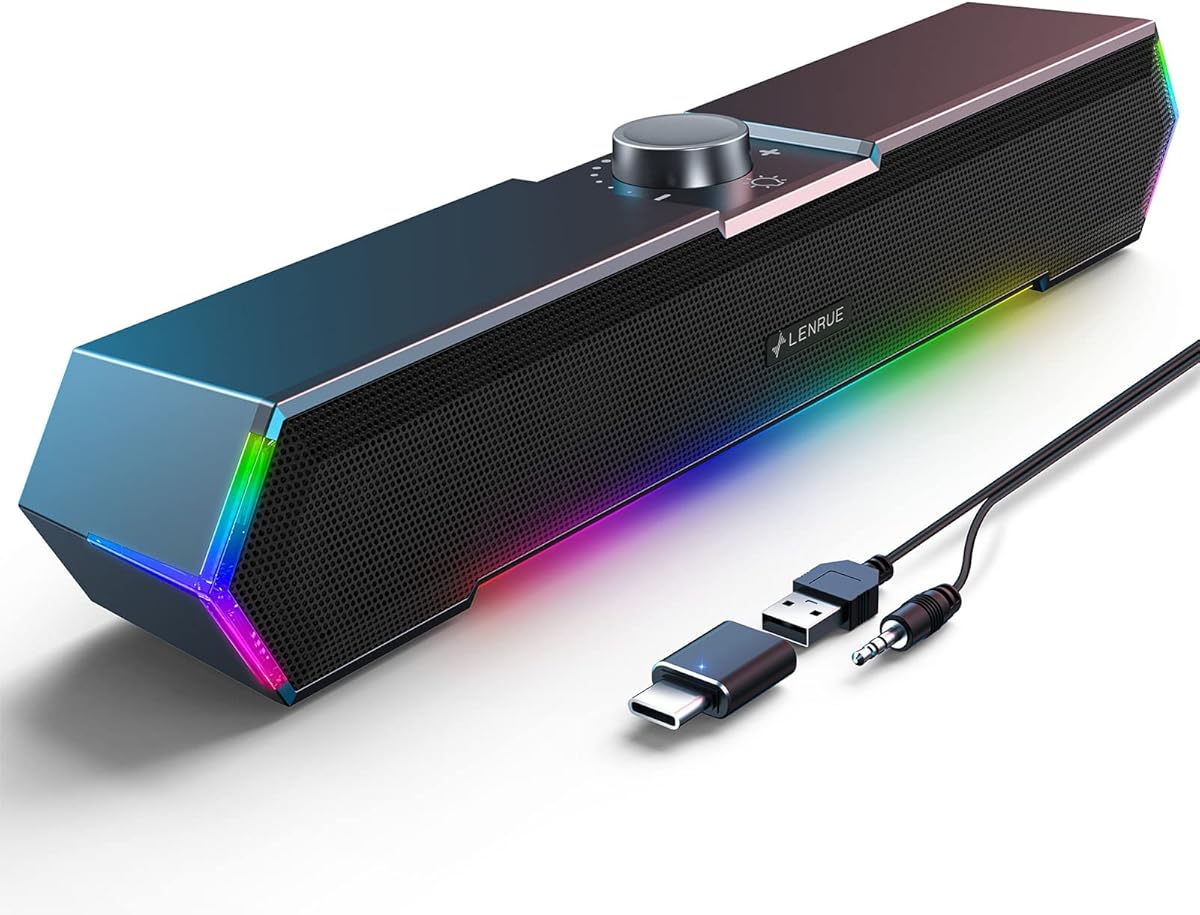
The LENRUE G11 combines atmospheric lighting with clear audio for a unique desktop experience. Surge stereo sound utilizes large amplifier ICs to minimize noise and maximize clarity. The touch angular game lights add a dynamic visual element with one touch control.
We may earn a commission when you buy through this link, at no additional cost to you.
Cables are glued together to reduce clutter and maintain a tidy setup. A top volume knob allows for easy adjustments without reaching for the system settings. The included USB C adapter ensures compatibility with modern devices and laptops.
While it lacks Bluetooth or a microphone, it excels in wired audio performance. The sound quality is free from distortion even at higher volumes. The design focuses on immersion making it suitable for gamers and media enthusiasts seeking an engaging experience.
Choose this speaker for a visually engaging setup with strong audio capabilities. It works well with desktops and laptops. The combination of touch controls and surge audio makes it a compelling option for immersive media consumption.
Touch activated lights create a vibrant gaming or viewing environment without complex configuration or buttons.
Large amplifier components ensure noise free audio that remains clear during intense listening or gaming.
We may earn a commission when you buy through this link, at no additional cost to you.
This model provides a straightforward and loud audio experience for basic computing needs. Upgraded 2x3W technology ensures clear and distortion free Hi Fi sound. It is plug and play requiring no drivers and offering immediate use out of the box.
We may earn a commission when you buy through this link, at no additional cost to you.
Anti slip foot pads keep speakers stable on any surface. Cables are glued together to avoid clutter and extend up to 31 inches for flexible placement. This allows placement under monitors or next to PCs without stretching cables.
While the design is simple, the warranty and support offer peace of mind for budget buyers. It works with a range of modern operating systems seamlessly. The focus on volume and ease of use makes it reliable for casual listening tasks.
Buyers prioritizing value and simplicity should consider this model for quick audio upgrades. It is suitable for home offices and small setups. The warranty and flexible cable length add to its appeal as a cost effective solution.
Long glued cables allow for placing speakers exactly where needed without managing loose or tangled wires.
A comprehensive warranty and lifetime user support ensure help is available if issues arise later.
We may earn a commission when you buy through this link, at no additional cost to you.
Selecting the right budget speakers involves balancing audio quality, connectivity, and build durability. This section outlines key factors to consider for making an informed purchase.
Look for wattage ratings that match your room size. Higher RMS power generally means louder sound without distortion. Small USB speakers often have limited power but suffice for close listening.
Ensure the speaker delivers enough volume for your environment.
Check for USB, auxiliary, or USB C inputs. USB powered models are simpler but may lack flexibility. USB C support is vital for newer laptops without standard ports.
Confirm compatibility with your computer ports.
Review driver size and technology like passive radiators. These components improve bass response and clarity. Frequency response ranges affect detail in highs and lows.
Prioritize specs that promise balanced audio.
Materials like metal or anti slip pads enhance durability and stability. A sturdy base prevents tipping and protects surfaces. Scratch resistant finishes maintain aesthetics over time.
Choose durable materials for long term use.
Measure your desk area to fit the speakers comfortably. Compact or clip on models save valuable space. Monitor mounts can free up desk surface for other tools.
Select a form factor that suits your layout.
Features like RGB lighting, inline controls, or headphone jacks add utility. Touch controls can be convenient but vary in reliability. Extra ports improve versatility for headphones or other devices.
Decide which extras matter most to you.
Ensure drivers work with Windows, macOS, or Linux. Some models require specific audio settings or updates. Plug and play options reduce setup complexity for all users.
Verify OS support before purchasing.
Check the length of warranty coverage and customer support availability. Better warranties protect against defects and failures. Access to support can resolve setup or hardware issues.
Look for reputable brand support policies.
Connect the speakers to your computer using the provided USB or audio cables. Ensure the ports are secure and the power light indicates a working connection. Set your computer audio output to the speakers via system settings.
Adjust the volume using the inline knob or system settings to prevent distortion. Position the speakers at ear level and angled toward you for best sound. Avoid blocking the drivers or passive radiators with objects.
Keep the speakers clean by dusting them regularly with a soft cloth. Avoid exposing them to moisture or extreme temperatures. Unplug the USB when not in use to prolong the lifespan of the components.
Many budget speakers deliver sufficient volume for most home gaming scenarios. Look for models with dual drivers and passive radiators for better clarity. If you need high volume for large rooms, consider larger setups.
Most USB speakers are plug and play and work without additional drivers. Simply connect to a USB port and select the device in audio settings. Some systems may require driver updates for optimal performance.
Most models listed support macOS and ChromeOS natively via USB or auxiliary inputs. Check specific compatibility notes for older Mac models. Drivers are rarely required for basic audio playback.
Set your system volume to maximum and use the inline speaker knob to adjust. Ensure the USB port provides adequate power to the device. Check for muted settings in the operating system mixer.
Most cheap USB speakers are wired and do not include Bluetooth. Bluetooth models are usually priced higher than budget wired options. Check the product specs specifically for wireless support if needed.
They work with monitors that have USB ports if they pass through power and audio. Some monitors may not provide enough power for USB speakers. Using a direct computer port is generally more reliable.
With proper care, budget speakers can last several years of typical use. Avoid overvolting or exposure to liquids for longevity. Warranty support varies but often covers one year of usage.
Most models are USB powered and do not require extra adapters. This simplifies setup and reduces cable clutter. Ensure your USB port provides enough power for the speakers.
We reviewed ten top options ranging from basic USB units to more advanced soundbars. The Creative Pebble 2.0 and FUNLOGY Speaker lead in performance and design. Budget picks like MELOGAGA RGB offer style at low prices.
Prioritize connectivity and space savings based on your desk layout. Features like touch controls or RGB can enhance the experience but are optional. Ensure the model fits your operating system and power sources.
Always verify current prices and availability before purchasing as deals change. Compare features against your specific audio needs to find the best fit. These models provide solid value for budget conscious users.