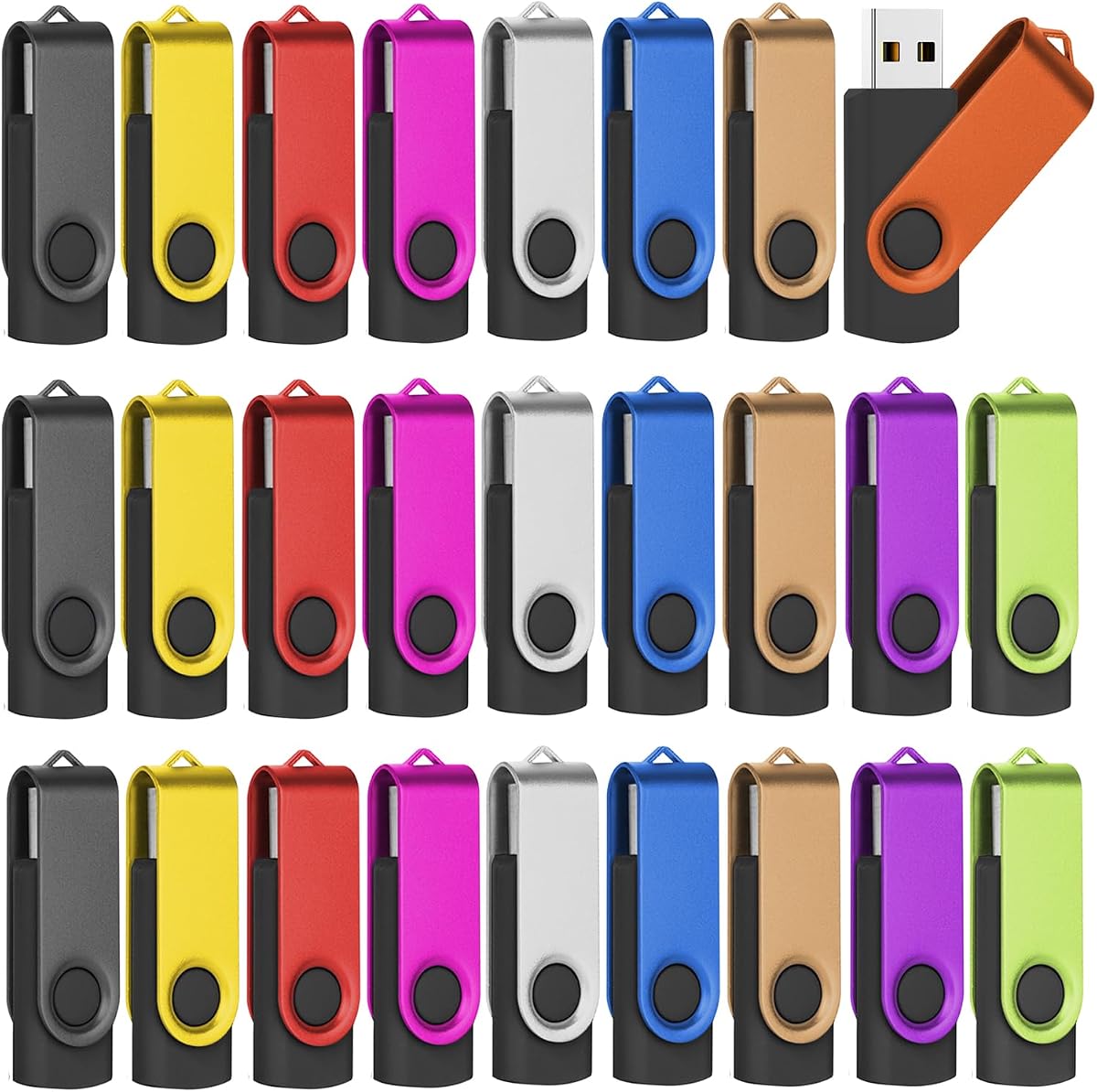
128MB 2.0 USB Flash Drive 50-Pack with Lanyards
4.5Editor score
Fifty pack with lanyards
Metal cover prevents fingerprints
Compatible with Windows and Mac
This guide compares the top ten bulk USB flash drives for businesses and schools, evaluating speed, capacity, and durability to help you choose the right bulk
Finding reliable bulk USB flash drives is essential for schools and businesses that need to distribute files efficiently. These drives offer portable storage that works across many devices without requiring special software or setup for users.
We compared ten different bulk packs based on capacity, transfer speeds, and build quality to find the best options. Each product was analyzed for its suitability for large scale distribution and long term reliability in various environments.
Every pick highlights key features and real world use cases to help you decide quickly. Please note that prices and availability change frequently so check current listings before making your final purchase decision.
4.5Editor score

4.6Editor score

4.6Editor score
This side by side comparison reviews all ten bulk USB flash drive packs to highlight their unique strengths and weaknesses for bulk purchasing needs.


The PNY 32GB Turbo Attaché offers excellent performance with its USB 3.0 interface making it ideal for transferring large files quickly. This pack provides ten durable drives that are perfect for businesses needing reliable portable storage without sacrificing speed.
We may earn a commission when you buy through this link, at no additional cost to you.
These drives feature transfer speeds up to ten times faster than standard USB 2.0 models. The sliding collar design protects the connector without needing a separate cap which reduces the risk of losing parts during daily use.
While the sliding mechanism is convenient it may wear down faster than a cap design over years of heavy use. However for most professional and educational environments this trade-off is acceptable given the significant speed advantage.
Buyers looking for high speed bulk storage should consider this pack. It balances performance and durability well making it a top choice for schools and offices distributing software or media files.
With USB 3.0 compatibility these drives handle large video and document files efficiently saving valuable time during bulk transfers.
The sliding collar keeps the port protected while eliminating the need for a separate cap that could easily get lost.
We may earn a commission when you buy through this link, at no additional cost to you.
This bulk pack offers one hundred drives with 512MB capacity each which is suitable for distributing small documents or text based files. It is an economical choice for events where individual data needs are minimal.
We may earn a commission when you buy through this link, at no additional cost to you.
The metal clip design allows users to attach drives to keychains or bags easily. These drives are ready to use out of the box without requiring any additional software installation on Windows or Mac systems.
The low capacity limits their usefulness for modern multimedia files which often exceed 512MB in size. Users should only consider these for text documents or small configuration files rather than videos.
Organizations needing many drives for basic data sharing will find this pack practical. It is a cost effective solution for conferences or classrooms distributing simple handouts.
Buying one hundred drives at once reduces the cost per unit significantly compared to purchasing individual storage devices.
The mini size ensures these drives fit easily in pockets or bags making them convenient for on the go data access.
We may earn a commission when you buy through this link, at no additional cost to you.
The Micro Center SuperSpeed drives provide ample storage with 64GB capacity per unit ideal for storing software or media files. The fast USB 3.0 performance ensures efficient data transfer across various devices.
We may earn a commission when you buy through this link, at no additional cost to you.
This pack includes twenty drives which is sufficient for medium sized teams or schools. The hard plastic cover protects the USB connector from damage during transport and storage in drawers or bags.
While the price is higher than standard USB 2.0 drives the speed and capacity justify the investment. The included warranty adds peace of mind for bulk purchases intended for long term use.
Buyers seeking reliable high capacity storage should prioritize this option. It offers a strong balance of speed space and protection making it ideal for professional workflows.
Transfer speeds reaching up to 70MB/s significantly reduce wait times when moving large files between computers or networks.
The hard plastic casing prevents physical damage to the drive components ensuring longevity in demanding environments.
We may earn a commission when you buy through this link, at no additional cost to you.
This pack offers fifty drives each with 128MB capacity which is suitable for small text files or simple data tasks. The included lanyards make it easy to attach drives to keys or bags for safe keeping.
We may earn a commission when you buy through this link, at no additional cost to you.
The drives come in multiple colors helping users organize different categories of data easily. The frosted metal cover resists fingerprints and provides a sleek look for professional distribution at events.
The capacity is not enough for modern media files but works well for documents or configuration settings. USB 2.0 speeds are adequate for small transfers though slower than modern alternatives.
Those needing a large number of drives for basic tasks will find this pack valuable. It is a practical choice for teachers or event organizers distributing digital handouts.
Different colors allow for quick visual identification of specific file types or groups during distribution.
Each drive comes with a lanyard ensuring users can carry them securely without fear of loss.
We may earn a commission when you buy through this link, at no additional cost to you.
XUANREG provides a fifty pack of black USB drives ideal for bulk distribution in office settings. The design is simple and professional fitting well with corporate branding or standard equipment.
We may earn a commission when you buy through this link, at no additional cost to you.
These drives work with Windows Mac and Linux systems without needing driver installation. They are suitable for storing small files like contact lists or text documents that do not require high speed transfer.
The limited capacity makes them less useful for modern multimedia but perfect for text based data. The lightweight design ensures they are easy to carry and store in large quantities.
Organizations requiring a large quantity of basic drives will find this option cost effective. It is a solid choice for distributing simple data sets or software keys.
These drives work seamlessly with Windows Linux and Mac operating systems for broad user support.
The sleek black finish looks professional and blends well with other office technology devices.
We may earn a commission when you buy through this link, at no additional cost to you.
The KOOTION pack offers twenty drives with 16GB capacity which is sufficient for small presentations or music files. The swivel design protects the USB port without requiring a separate cap.
We may earn a commission when you buy through this link, at no additional cost to you.
This design reduces the risk of losing a cap while still keeping the port safe from dust and scratches. The integrated loop allows easy attachment to keychains for added convenience during travel.
While the USB 2.0 interface is slower than 3.0 it is adequate for many basic transfer tasks. The storage size is a good balance for everyday document storage needs.
Buyers looking for durable caps with good storage will appreciate this design. It is a reliable option for school projects or small business file sharing.
The rotating metal cover shields the USB connector from physical damage without extra parts.
The built-in loop allows users to attach drives securely to bags or keys to prevent loss.
We may earn a commission when you buy through this link, at no additional cost to you.
EASTBULL provides a large fifty pack of drives with 16GB capacity each suitable for enterprise distribution. The quality control process ensures consistency across all units in the batch.
We may earn a commission when you buy through this link, at no additional cost to you.
These drives are pre formatted for compatibility with most systems making them ready to use immediately. The included lanyards help users keep track of drives during conferences or training sessions.
The USB 2.0 interface is standard for this price point but limits transfer speeds for large files. However the capacity is ample for documents and simple media tasks.
Businesses needing reliable bulk drives for employees or partners will find this pack useful. It offers a good balance of quantity and storage for professional applications.
Each drive undergoes double testing to ensure consistent performance across the entire bulk batch.
The pack includes both drives and lanyards providing everything needed for immediate distribution and use.
We may earn a commission when you buy through this link, at no additional cost to you.
This pack offers twenty compact drives with 4GB capacity which is suitable for small files or system tools. The aluminum casing provides durability for everyday use in various environments.
We may earn a commission when you buy through this link, at no additional cost to you.
An LED indicator lights up when data is being transferred providing visual feedback to users. This feature helps prevent accidental removal of drives which can cause data corruption.
The capacity is limited for modern media but works well for small data transfers. The swivel cap protects the port while keeping the drive compact enough for pockets.
Those needing durable compact drives for simple tasks will find this pack useful. It is a good choice for distributing small software updates or drivers.
The LED light confirms data transfer activity helping users avoid removing drives prematurely.
The metal casing withstands daily wear and tear better than plastic alternatives.
We may earn a commission when you buy through this link, at no additional cost to you.
EASTBULL provides a fifty pack of blue drives with 16GB capacity for distinct identification. The blue color helps differentiate these drives from others in mixed storage environments.
We may earn a commission when you buy through this link, at no additional cost to you.
These drives are designed for consistent performance with high quality chips ensuring reliable data storage. They are pre formatted for easy use across different operating systems without configuration.
The storage capacity is suitable for documents and small media files. The USB 2.0 interface is compatible with most devices but limits transfer speeds for large files.
Organizations needing color coded drives for departments will find this pack useful. It offers a reliable solution for bulk distribution with visual distinction.
The blue finish helps easily distinguish these drives from others in mixed storage setups.
High quality chips ensure consistent data storage and retrieval across all units.
We may earn a commission when you buy through this link, at no additional cost to you.
FEBNISCTE offers a ten pack of drives with 64GB capacity and varied colors for organization. The high capacity per unit makes them suitable for larger data storage needs.
We may earn a commission when you buy through this link, at no additional cost to you.
The color coding helps users identify drives for specific projects or departments quickly. The swivel design protects the USB port while allowing compact transport in pockets.
The pack count is smaller than others but the higher capacity compensates for many users. The USB 2.0 interface is compatible with most systems but slower than newer standards.
Buyers needing higher storage with visual organization will find this pack valuable. It is a good option for creative teams or students managing larger files.
64GB per drive allows storage of larger software or media files without external solutions.
Different colors help users quickly identify drives assigned to specific teams or tasks.
We may earn a commission when you buy through this link, at no additional cost to you.
Selecting the right bulk USB flash drives depends on several factors including capacity, speed, and durability requirements.
Capacity determines how much data each drive can hold. For simple documents 128MB to 512MB may suffice. For software or media files 16GB or higher is recommended.
Choose capacity based on your typical file sizes to avoid running out of space quickly.
USB 3.0 drives transfer data significantly faster than USB 2.0 models. If speed is a priority for large file transfers look for USB 3.0 compatibility.
USB 2.0 is acceptable for small files but may cause delays with larger data sets.
Durability varies between plastic and metal constructions. Metal bodies often withstand daily wear better while plastic options may be lighter.
Select a build that matches the physical stress levels expected during use.
Bulk packs range from ten to one hundred units. Choose a quantity that meets your distribution needs without excess inventory.
Consider storage space and budget when selecting pack sizes to avoid waste.
Some packs include lanyards which help prevent loss. If portability is a priority ensure lanyards are included or purchase them separately.
Lanyards make it easier for users to attach drives to bags or keys.
Most USB drives are compatible with Windows Mac and Linux. Verify compatibility with your specific OS to avoid issues.
Plug and play functionality is standard but check for driver requirements if any.
Some brands offer warranties such as 2 years which provide protection against defects. This is valuable for bulk purchases.
Look for warranty terms that cover replacement or refunds for faulty units.
Drives often come formatted as FAT32 which works on most systems. This limits file sizes to 4GB but ensures broad compatibility.
If you need larger single file support check if reformatting is an option.
Insert the drive into a USB port on your computer and wait for the system to recognize it. Open the file explorer to access the drive and transfer files by dragging and dropping.
Always eject the drive safely before removing it to prevent data loss. Use the operating system's eject option to ensure all write operations are complete.
Store drives in a cool dry place to avoid physical or environmental damage. Avoid exposing them to extreme temperatures or moisture which can degrade components over time.
Bulk USB drives can be used for sensitive data if encryption software is installed. Most standard drives do not include encryption by default so additional steps are necessary for security.
Most drives come pre-formatted as FAT32 which works across Windows and Mac. For larger file support consider reformatting to exFAT using disk management tools.
Most bulk drives are empty out of the box requiring you to add software. Some vendors may offer custom loading but this usually requires a separate request.
Yes bulk USB drives are reusable and can be formatted multiple times. However repeated writing may eventually wear out the memory chip over years of use.
USB 3.0 offers faster transfer speeds compared to USB 2.0. For small files the difference is minimal but large transfers benefit significantly from 3.0 speeds.
Yes most USB flash drives work with Mac computers via USB ports. Ensure the drive is formatted correctly for Mac compatibility if necessary.
Estimate based on expected attendees and data needs. Order a small buffer to account for damage or loss during the event.
USB drives are generally suitable for short to medium term storage. For long-term archival use redundant backups are recommended to prevent data loss.
This guide covered ten top bulk USB flash drives suitable for schools businesses and events. Each option offers distinct strengths depending on capacity and speed requirements.
Prioritize capacity and durability based on your specific use case. High speed USB 3.0 drives are ideal for large files while USB 2.0 suits smaller documents.
Remember to check current prices and availability before purchasing. Bulk deals may change so verify the best value at the time of order.