
HP DeskJet 2955
3.7Editor score
Affordable entry price
Mobile printing options
Basic scanning functions
This expert guide compares the top ten affordable fax machines and all-in-one printers for home and office use to help you find the best cheap fax machine.
Finding a reliable communication tool for your home office can be challenging when budget constraints are a priority. A cheap fax machine offers a practical solution for sending and receiving documents without breaking the bank. These devices ensure you stay connected with clients and partners efficiently while keeping costs low for your business operations.
We have evaluated ten top-rated models based on performance, features, and user feedback to bring you this comprehensive list. Our analysis focuses on machines that deliver consistent faxing capabilities alongside additional utilities like copying and scanning. This approach helps you identify devices that offer the best value for your specific communication needs.
Each pick in this guide highlights key strengths and potential limitations to give you a clear picture of what to expect. The models range from dedicated fax units to versatile all-in-one printers that support fax functionality. Please note that availability and costs may vary over time so check current listings before purchasing.
3.7Editor score

3.8Editor score

4.0Editor score
The following table provides a side-by-side overview of the ten selected fax machines and printers. It highlights key specifications and capabilities to help you compare models quickly and choose the right device for your needs.




The Canon PIXMA TR4720 stands out as a top contender for those seeking a cheap fax machine that does not compromise on versatility. With a solid rating and comprehensive feature set it delivers reliable faxing alongside printing scanning and copying. This makes it an ideal choice for small home offices needing multifunctional capabilities.
We may earn a commission when you buy through this link, at no additional cost to you.
Its built-in fax capability ensures you can send documents directly without needing a separate line or device. The auto document feeder simplifies batch faxing tasks saving time during busy workdays. Wireless connectivity allows seamless integration with smartphones and computers making remote printing effortless for users on the go.
While the device performs well overall users should be aware of ink consumption rates which might affect long-term costs. The print speed is adequate for basic needs but may feel slow for high volume workflows. However these trade-offs are acceptable given the affordable price point and broad functionality it provides.
Home office professionals and small business owners will find this model particularly useful for its balance of cost and utility. It ensures your fax needs are met without investing in expensive dedicated hardware. We recommend this machine for anyone prioritizing convenience and multifunctionality in a budget-friendly package.
The Canon PRINT app enables you to manage print and fax tasks directly from your mobile device for greater flexibility.
The auto document feeder allows for quick scanning and faxing of multi page documents without manual page turning.
We may earn a commission when you buy through this link, at no additional cost to you.
The HP DeskJet 2955 is an excellent starting point for users needing a cheap fax machine on a tight budget. It offers essential printing and faxing capabilities wrapped in a sleek compact design. The inclusion of an instant ink trial helps new users manage initial costs effectively while testing the device.
We may earn a commission when you buy through this link, at no additional cost to you.
Key strengths include its ease of setup and wireless connectivity which cater to modern home office environments. The AI capabilities help optimize print formatting reducing wasted paper and improving document quality. This makes it a practical choice for sending occasional faxes without significant overhead.
However the fax functionality is not as robust as dedicated machines so it may not suit high volume needs. Users should also consider the ongoing ink subscription model which applies after the trial period ends. These factors are important to weigh when deciding if this budget option meets your long term requirements.
If you need a basic fax solution for infrequent use this model offers great value for money. It handles everyday tasks efficiently without demanding a large upfront investment. We suggest this printer for individuals or small businesses prioritizing affordability and simplicity over advanced fax features.
Instant Ink delivery service ensures you never run out of ink automatically keeping your device ready for any fax task.
HP AI helps remove unwanted content from web pages ensuring clean and professional looking fax documents.
We may earn a commission when you buy through this link, at no additional cost to you.
The Canon PIXMA TR8620a represents a premium tier option for those wanting advanced features in a cheap fax machine category. It combines high performance printing with robust fax capabilities and smart home integration. Its high rating reflects user satisfaction with its speed and ease of use in demanding environments.
We may earn a commission when you buy through this link, at no additional cost to you.
Standout features include voice control via Alexa which allows hands-free operation for printing or checking ink levels. The large paper capacity and auto duplex printing reduce manual intervention and save time during heavy workloads. This makes it a strong choice for small offices needing efficiency without sacrificing quality.
While the price is higher than basic models the productivity gains justify the investment for many users. The energy star rating ensures it remains cost effective to operate over time. Trade-offs include its larger size which requires more desk space but this is often worth the added functionality.
Business professionals requiring reliable fax and print services will appreciate the versatility of this unit. It offers a comprehensive suite of tools that streamline daily operations effectively. We recommend this model for users seeking a high performance multifunctional printer with advanced fax support.
Alexa integration allows you to print or check status using voice commands simplifying your workflow.
The 200 sheet paper capacity and duplex printing minimize downtime and reduce paper waste significantly.
We may earn a commission when you buy through this link, at no additional cost to you.
The Brother FAX-575 Personal is a dedicated unit designed for straightforward faxing needs without extra complexity. It combines fax phone and copier functions in one device ensuring you have all essential tools ready. Its high rating indicates strong reliability for users who prefer traditional fax hardware over multifunctional printers.
We may earn a commission when you buy through this link, at no additional cost to you.
Key strengths include its substantial memory capacity which allows storing up to 25 pages for transmission. The fast modem speed ensures quick document delivery reducing wait times during peak business hours. This functionality is crucial for businesses that rely on timely document exchange and secure communication channels.
One limitation is the lack of wireless capabilities which may limit flexibility for mobile users. The design reflects older technology standards which might not appeal to those seeking modern connectivity. However for users prioritizing robust dedicated fax performance these factors are minor compared to its reliability.
Office managers needing a stand-alone fax solution will find this device dependable and efficient. It avoids the complexity of printer drivers or network configurations. We recommend this machine for environments where reliable and fast faxing is the primary requirement for daily operations.
With 512 KB memory the device stores multiple pages for batch faxing reducing manual input needs.
The built-in handset allows easy voice communication alongside fax tasks enhancing office utility.
We may earn a commission when you buy through this link, at no additional cost to you.
Choosing the Brother FAX-575 Renewed offers a smart way to access reliable fax hardware at a reduced cost. This refurbished model retains the full functionality of the new version including fax phone and copier features. It appeals to budget conscious buyers who want performance without paying premium prices for unused equipment.
We may earn a commission when you buy through this link, at no additional cost to you.
The renewal process ensures the device is tested and cleaned before shipping giving users confidence in its operation. You gain access to the same memory and transmission speeds as the new model without the higher cost. This makes it an attractive option for small businesses aiming to minimize capital expenditure on office tech.
Consider that cosmetic wear might be present and warranties can differ from brand new units. However these differences do not impact the core performance of the fax or copier functions. If cost is a priority the renewed option provides a solid balance between quality and affordability for your office needs.
We suggest this choice for those comfortable with refurbished electronics seeking a functional fax solution. It supports sustainable practices by extending the life of electronic devices. Overall it remains a strong contender for anyone looking to acquire a capable fax machine economically.
Buying renewed reduces electronic waste while giving you access to high performance fax hardware at lower costs.
The device undergoes testing to ensure it meets performance standards before reaching your desk.
We may earn a commission when you buy through this link, at no additional cost to you.
The Sharp UXB20 is an inkjet fax machine designed to provide reliable document transmission using plain paper. It supports basic faxing with added copying capabilities making it versatile for simple office needs. The modem speed ensures reasonable transmission times which is beneficial for routine business communication requirements.
We may earn a commission when you buy through this link, at no additional cost to you.
A notable feature is the large memory capacity allowing you to store multiple pages for delayed sending. The speed dial presets simplify frequent faxing tasks reducing the need for manual number entry. These conveniences help streamline workflows in environments where documents are faxed regularly to the same contacts.
However the product rating suggests some users have experienced issues with ink maintenance or connectivity. Inkjet technology requires regular use to prevent printhead clogs which can affect fax quality. Buyers should weigh this against the benefits of plain paper output versus thermal alternatives for their specific use case.
For small offices needing an affordable inkjet fax solution this unit offers adequate performance. It handles everyday tasks without demanding complex setup or expensive consumables. We recommend it for users who prefer standard paper and need consistent faxing without high volume demands.
With 30 speed dial presets you can quickly access frequently used fax numbers to save time.
449 KB memory holds 24 pages for out-of-paper scenarios ensuring your faxes are not lost.
We may earn a commission when you buy through this link, at no additional cost to you.
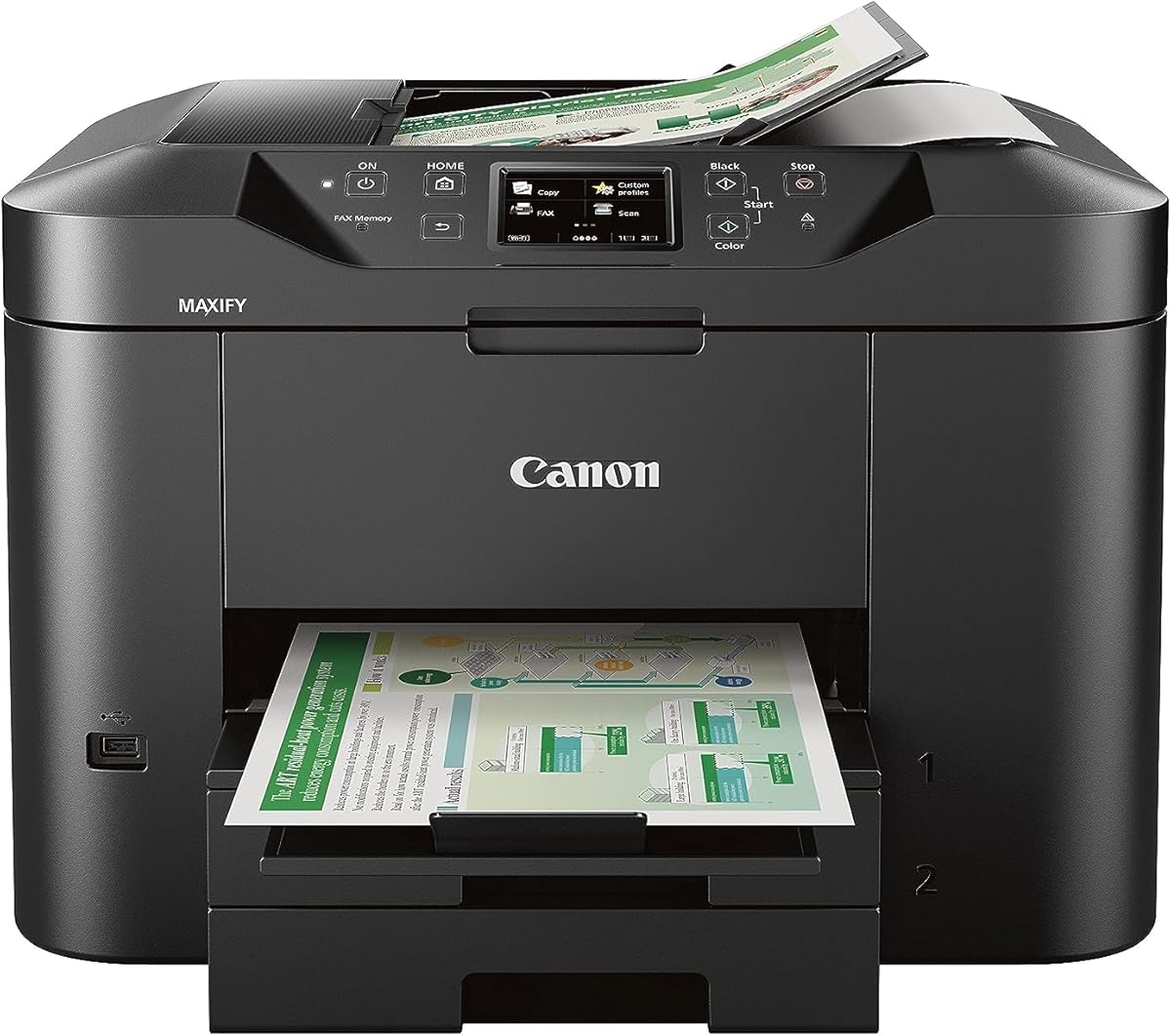
The Canon MAXIFY MB2720 is primarily a business printer but supports fax functionality for comprehensive document management. It is built for durability with a high duty cycle suitable for heavy daily usage in active offices. Its wireless connectivity ensures seamless integration with various devices for flexible printing and faxing tasks.
We may earn a commission when you buy through this link, at no additional cost to you.
Key features include dual paper cassettes offering a combined 500 sheet capacity which minimizes refilling needs. The ink technology produces sharp text that resists smudging and highlighting ensuring professional looking output. This makes it ideal for offices needing both high quality prints and reliable fax capabilities in one unit.
While it excels in printing the fax features are secondary to its core functions. Users looking for a dedicated fax machine might find the fax menu less intuitive than on a standalone unit. However for businesses prioritizing printing performance with added fax utility this trade-off is often acceptable.
We recommend this model for small businesses needing a robust printer that handles fax tasks as needed. It reduces desk clutter by combining multiple functions into a single reliable machine. Overall it is a strong choice for high volume environments seeking efficiency and professional output.
Two cassettes provide 500 sheets total reducing the frequency of paper refills during busy workdays.
DRHD inks ensure text remains sharp and smudge free enhancing the professionalism of your faxed documents.
We may earn a commission when you buy through this link, at no additional cost to you.
The Brother IntelliFAX-2840 brings laser quality to fax machines ensuring sharp and professional document output. It is designed for speed with a 21 ppm rating that keeps workflow efficient during busy periods. This machine appeals to users who value print quality and speed over advanced connectivity features.
We may earn a commission when you buy through this link, at no additional cost to you.
Its plain paper output avoids the need for thermal paper rolls which can fade over time. The compact design fits easily into smaller workspaces without sacrificing performance capabilities. This makes it a practical choice for home offices or small businesses with limited desk space.
Users should note the lack of network readiness which limits sharing options across a network. The feature set focuses on core faxing and printing tasks without extra connectivity bells or whistles. While this simplifies operation it may not suit larger offices needing network-wide access to fax capabilities.
We suggest this machine for those prioritizing speed and output quality in a budget-friendly laser unit. It delivers consistent results without complex setup requirements. For straightforward fax needs with high-quality prints this model offers a reliable and efficient solution for daily use.
Laser technology ensures your faxes have crisp edges and clear text improving document professionalism.
With 21 ppm speed this unit handles documents quickly reducing wait times during busy periods.
We may earn a commission when you buy through this link, at no additional cost to you.
The Brother IntelliFax 575 Thermal utilizes thermal transfer technology for reliable and efficient faxing. It is designed to minimize costs and energy usage making it a practical choice for budget-conscious users. The Energy Star rating ensures it operates efficiently which helps keep long-term running costs low for your office.
We may earn a commission when you buy through this link, at no additional cost to you.
Its 512 KB memory supports storing multiple pages ensuring your faxes are sent even if paper runs out. The 10 sheet auto document feeder simplifies sending multiple pages without manual feeding. These features make it convenient for small businesses needing occasional but consistent faxing capabilities.
One limitation is the reliance on thermal paper which may not be suitable for all document archiving needs. The resolution is lower than laser options but sufficient for most text based documents. Users should consider their document storage requirements before committing to thermal paper formats.
We recommend this model for users seeking a cost-effective and energy efficient fax machine. It provides essential functions without complex setup or high costs. For basic fax needs in a low budget environment this device offers dependable performance and simplicity.
Energy Star certification ensures low power consumption reducing environmental impact and operating costs.
512 KB memory stores up to 25 pages so you never lose data due to paper jams.
We may earn a commission when you buy through this link, at no additional cost to you.
The Panasonic KX-FHD331 is a straightforward plain paper fax machine designed for simple communication needs. It supports caller ID and answering machine interfaces which adds basic telephony features to your setup. This makes it suitable for users who want a no-frills fax solution that integrates easily with existing home phone systems.
We may earn a commission when you buy through this link, at no additional cost to you.
Its plain paper output avoids thermal paper issues ensuring faxes are more durable and easier to read over time. The 9.6 Kbps modem speed provides standard transmission rates for typical document sizes. An exchange program is available offering some assurance in case of product issues or defects.
The lower user rating suggests potential reliability or feature limitations compared to other models. Users may find the interface less modern and advanced features limited to core faxing tasks. However for those needing basic functionality the simplicity of this model can be seen as a benefit.
We suggest this machine for users with minimal faxing requirements and existing analog phone setups. It provides essential fax and caller ID functions without complexity. If your needs are limited to occasional basic faxes this model offers a functional and budget-friendly option.
Built-in caller ID lets you identify callers before answering which helps manage incoming fax and voice calls.
A six month warranty with exchange program provides peace of mind regarding product reliability and support.
We may earn a commission when you buy through this link, at no additional cost to you.
Selecting the right fax machine involves considering several factors to ensure it meets your specific needs. This guide breaks down key elements to help you make an informed decision.
Fax machines generally come in thermal or plain paper varieties. Thermal units use special paper that can fade over time while plain paper models use standard sheets which are easier to file and archive. Plain paper fax machines are more versatile for offices that need to maintain long term physical records.
Choose plain paper if you need durable documents and thermal if you want lower initial costs.
Modern all-in-one printers often offer wireless connectivity allowing you to send faxes from smartphones or computers. Dedicated fax machines usually rely on phone lines. If you work remotely or want mobile flexibility a wireless model is better.
Wireless connectivity provides greater flexibility for modern home offices working remotely.
Memory capacity determines how many pages the device can store for later transmission. This is useful if the device runs out of paper or is busy with another task. Look for at least 512 KB memory to store around 25 pages comfortably.
Higher memory ensures your faxes are not lost if the device runs out of paper temporarily.
Modem speed affects how quickly documents are transmitted. A 9.6 Kbps rate is standard but faster rates like 33.6 Kbps reduce wait times. For high volume needs faster transmission speeds will save valuable time during busy periods.
Faster modem speeds reduce wait times and improve overall fax transmission efficiency.
Paper capacity and auto document feeders streamline workflow by reducing manual loading. A machine with 100 sheets or more minimizes interruptions. Auto feeders allow batch sending without page by page input.
Look for at least 50 sheets and auto feeders to simplify batch faxing tasks.
Many cheap fax machines are part of all-in-one units including printer and scanner functions. This saves space and cost if you need multiple devices. Check that the unit supports scanning from both top and flatbed for versatile document handling.
All-in-one units provide better value by combining fax with printing and scanning capabilities.
Initial purchase price is only part of the cost. Inkjet models may have ongoing ink costs while laser or thermal have different consumable expenses. Evaluate total cost of ownership to ensure affordability over time.
Consider ongoing consumable costs like ink or toner when calculating total budget requirements.
Desk space is often limited in home offices. Choose a compact model with efficient footprint if space is tight. Larger all-in-one units require more area but offer more features.
Compact designs save space while all-in-one units offer more features at a larger footprint.
To use your fax machine effectively place the document face down in the feeder and dial the recipient number. Verify the number before pressing send to ensure the transmission goes to the correct party.
Regular maintenance such as cleaning the glass and rollers prevents paper jams and ensures clear transmissions. Keep the machine away from direct sunlight and moisture to protect internal components and extend device life.
Monitor ink or toner levels to avoid interrupted faxing. Replace consumables promptly to maintain print quality and prevent clogs. Periodic firmware updates can improve performance and compatibility with other devices.
Yes all dedicated fax machines and many all-in-one units connect to standard phone lines for fax transmission. Check that your device includes a telephone port and modem compatibility to ensure successful sending and receiving of faxes.
Some modern all-in-one printers support wireless faxing through apps or network connections. Dedicated cheap fax units typically rely on phone lines. Look for models with Wi-Fi if you want mobile fax capabilities without direct phone connections.
Thermal faxes use special heat sensitive paper that may fade over time. Plain paper uses standard sheets suitable for filing and archiving. Plain paper models are generally preferred for longevity and compatibility with existing office workflows.
Use all-in-one units that share ink cartridges between fax and printing to save money. Consider laser models for high volume tasks as toner costs are often lower per page than inkjet cartridges.
Most models need a standard phone line and electrical outlet. Wireless units need Wi-Fi access. Ensure your office has these basic setups ready before installing the machine to avoid complications during setup.
Prioritize wireless connectivity memory capacity and easy paper feeding for home offices. Look for models combining fax with printing and scanning to maximize utility without extra device costs.
Gently remove the jammed paper following the manufacturer manual. Check rollers for debris and ensure paper is loaded correctly. Regular maintenance prevents frequent jams and ensures smooth operation over time.
Most major brands offer replacement parts like ink cartridges and rollers online. Check manufacturer support pages for compatibility. Ensure parts are available before purchasing to avoid long downtime if components fail.
The ten models reviewed offer a range of options to fit different office needs and budgets. Whether you choose a dedicated fax unit or an all-in-one printer each provides reliable functionality for sending documents.
Prioritize features that matter most for your workflow like memory capacity connectivity or paper handling. A balanced approach between performance and cost ensures your device serves you well for years to come.
Remember to verify current availability and pricing before purchase as these details may change over time. We hope this guide helps you find a reliable and affordable solution for your fax needs.